Jekyll2024-09-03T07:38:19+00:00https://sitecore.merkle.com/feed.xmlSitecore Blog. Merkle DACH.Experience and knowledge about SitecoreMerkle DACHEXM campaign dispatch stopped because CM instance crashed2024-09-03T07:00:00+00:002024-09-03T07:00:00+00:00https://sitecore.merkle.com/exm-campaign-dispatch-stuck
Introduction
In the world of digital marketing, email campaigns are a crucial tool for engaging with our audience, driving conversions, and building brand loyalty.
However, even the most meticulously planned campaigns can face unexpected challenges. Recently, we encountered a significant disruption when our system crashed mid-dispatch, causing our email campaigns to get stuck. Here’s a look at what happened, how we responded, and the lessons we learned from the experience.
The Incident: When Things Went Off Track
The campaigns were designed to reach thousands of subscribers with personalized content that would resonate with their interests.
But then, the unexpected happened. Just as the second campaign of three was rolling out, our CM server crashed due to another issue.
The result? Hundreds of emails were stuck in limbo, neither reaching the inboxes nor bouncing back as undeliverable.
Recovery: Getting Back on Track
Once the system was back online, we had to decide how to proceed with the campaign.
Our options included resending the emails that were stuck or pausing the campaign altogether to avoid overwhelming our subscribers. After careful consideration, we chose to stagger the dispatch of the remaining emails. This allowed us to complete the campaign without bombarding recipients or risking further technical issues. We also took this opportunity to recheck the content and timing, ensuring that the messages were still relevant and effective.
Solution
Since the campaign with the status “Sending” stopped with a progress of 40%, we wanted to be sure and reach out to the Sitecore Support team to find the best technical solution.
In this case, we need to manually change the states. Pausing and resuming the campaign was not possible in our case. Clicking the Button in the Delivery tab of the campaign did not change anything.
So manually modifying the related message status in the EXM.Master DB helps.
By setting the status to Paused we were able to resume the campaing by clicking Resume in the Delivery tab of the campaign.
You need also to find the campaign in the Content Editor by searching with the campaign ID, unprotect the item, and set the status again there to Draft to be able to send the Mail through the UI. That worked out.
After the successful send-out of this campaign, the last one with the Status Queuing remains in that state. Sitecore does not get the information to continue with the next campaign. That needs to be considered.
So we decided here to set the state to Draft by utilizing the SQL statement from above.
Again, you need also to find the campaign in the content editor by searching with the campaign ID, unprotect the item, and set the status there to Draft to be able to send the Mail through the UI.
]]>dgashiExtend rich text editor for custom link type2024-05-06T05:00:00+00:002024-05-06T05:00:00+00:00https://sitecore.merkle.com/extend-rich-text-editor-for-custom-link-type
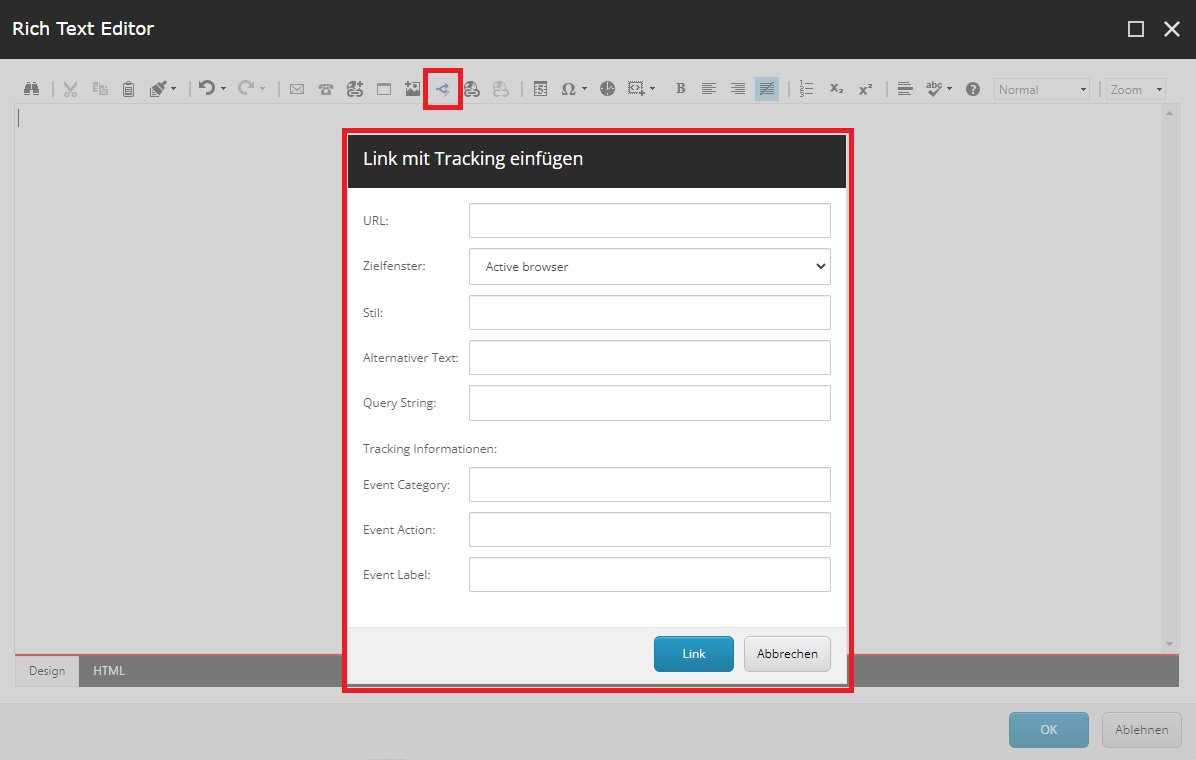
Based on the previous blog post about (extenting Sitecore’s general link), you may also want to enhance the content editing experience for your editors by extending the rich text editor with your newly created link.
In this tutorial, I’ll guide you through the steps to create a custom dialog for Sitecore’s rich text editor. To achieve this, follow the specified steps:
1. Create your custom DialogForm class
The first thing you need to do is create your custom DialogForm. It should derive from DialogForm, and you’ll need to override OnCancel and OnOK methods.
For example: Extending General Link Fields with Tracking Data
As in our example, you want to enhance the general link fields in your custom dialog by adding tracking data, specifically the fields EventCategory, EventAction, and EventLabel. You can follow these steps:
Create your custom DialogForm class, inheriting from the base DialogForm.
Override the OnCancel and OnOK methods to handle the dialog behavior.
In the OnOK method, retrieve the values from your custom fields (e.g., EventCategory, EventAction, and EventLabel).
Append these values to the result or perform any other necessary actions based on the user’s input.
usingSitecore;usingSitecore.Diagnostics;usingSitecore.Shell.Applications.ContentEditor;usingSitecore.Text;usingSitecore;usingSitecore.Diagnostics;usingSitecore.Web.UI.HtmlControls;usingSitecore.Web.UI.Pages;usingSitecore.Web.UI.Sheer;usingSystem;usingSystem.Diagnostics.CodeAnalysis;usingSystem.Text;namespaceYour.own.namespace{[ExcludeFromCodeCoverage]publicclassInsertLinkWithTracking:DialogForm{protectedEditURL;protectedComboboxTarget;protectedEditClass;protectedEditTitle;protectedEditQuerystring;protectedEditEventCategory;protectedEditEventAction;protectedEditEventLabel;protectedoverridevoidOnCancel(objectsender,EventArgsargs){Assert.ArgumentNotNull(sender,"sender");Assert.ArgumentNotNull(args,"args");if(this.Mode=="webedit"){base.OnCancel(sender,args);}else{SheerResponse.Eval("scCancel()");}}protectedoverridevoidOnOK(objectsender,EventArgsargs){Assert.ArgumentNotNull(sender,"sender");Assert.ArgumentNotNull(args,"args");if(string.IsNullOrWhiteSpace(URL.Value)){SheerResponse.Alert("Bitte geben Sie die URL ein.",Array.Empty<string>());}if(this.Mode=="webedit"){base.OnOK(sender,args);}else{varresult=newStringBuilder($"href=\"{URL.Value}");if(!string.IsNullOrWhiteSpace(Querystring.Value)){if(Querystring.Value.StartsWith("?")){result.Append(Querystring.Value);}else{result.Append($"?{Querystring.Value}");}}result.Append('"');if(!string.IsNullOrWhiteSpace(Target.Value)){switch(Target.Value){case"New":result.Append(" target=\"_blank\"");break;}}if(!string.IsNullOrWhiteSpace(Class.Value)){result.Append($" class=\"{Class.Value}\"");}if(!string.IsNullOrWhiteSpace(Title.Value)){result.Append($" title=\"{Title.Value}\"");}// Custom fields for tracking linkif(!string.IsNullOrWhiteSpace(EventCategory.Value)&&!string.IsNullOrWhiteSpace(EventAction.Value)&&!string.IsNullOrWhiteSpace(EventLabel.Value)){result.Append($" data-clickevent=\\'{{\"eventCategory\": \"{EventCategory.Value}\", \"eventAction\": \"{EventAction.Value}\", \"eventLabel\": \"{EventLabel.Value}\"} }\\'");}SheerResponse.Eval($"scClose('{result}')");}}protectedstringMode{get{stringstr=StringUtil.GetString(base.ServerProperties["Mode"]);if(!string.IsNullOrEmpty(str)){returnstr;}return"shell";}set{Assert.ArgumentNotNull(value,"value");base.ServerProperties["Mode"]=value;}}}}
Remark:
Each line of code except the custom field part originates from the decompiled source of the Sitecore’s code.
It is recommended to place the file in “…\sitecore\shell\Controls\Rich Text Editor...” where all the general controls for the rich text editor of Sitecore are placed.
2. Create the XML for your custom dialog
The next step is to create the visual presentation of the dialog. Therefore, you have to create an XML file which contains the control definition for the dialog.
In the example you can find the tree new fields (EventCategory, EventAction and EventLabel) for our custom tracking link. Additionally, the CodeBeside links to our previous created class.
3. Add your custom control to the rich text commands
In the third step, you need to extend the out-of-the-box JavaScript file that calls your dialog. Therefore, you can copy the default “RichText Commands.js”file from Sitecore and extend it with your newly created control. It is recommended to also place the file in “…\sitecore\shell\Controls\Rich Text Editor...”.
For our example, we added the following code snippet:
// Add the action from the HTML Edit Button Item to CommandList.Telerik.Web.UI.Editor.CommandList["InsertLinkWithTracking"]=function(commandName,editor,args){vard=Telerik.Web.UI.Editor.CommandList._getLinkArgument(editor);Telerik.Web.UI.Editor.CommandList._getDialogArguments(d,"A",editor,"DocumentManager");scEditor=editor;// Call the dialog box.editor.showExternalDialog("/sitecore/shell/default.aspx?xmlcontrol=RichText.InsertLinkWithTracking&la="+scLanguage,null,//argument500,//Width550,//HeightscInsertLinkWithTrackingCallback,//callbacknull,// callback args"InsertLinkWithTracking",true,//modalTelerik.Web.UI.WindowBehaviors.Close,// behaviorsfalse,//showStatusBarfalse//showTitleBar);};// The function is called when the user closes the dialog.functionscInsertLinkWithTrackingCallback(sender,returnValue){if(!returnValue){return;}varselectedHtml=scEditor.getSelectionHtml();if(typeofselectedHtml==="undefined"){scEditor.pasteHtml("","DocumentManager");}else{scEditor.pasteHtml("<a "+returnValue.text+">"+selectedHtml+"</a>","DocumentManager");}};
4. Add a custom button for the rich text editor
Last but not least a button needs to be placed on the rich text so that the dialog can be triggered.
Therefore follow these steps:
Switch the database in Sitecore to the core database and navigate to the following path: “/sitecore/system/Settings/Html Editor Profiles”. Here, you’ll find various rich text editor profiles that you can customize.
Select the profile you want to extend. For example, let’s say you choose the “Rich Text Full” profile.
Add a Html Editor Button to the toolbar. In our example we added the button to “Toolbar 1”.
Customize the button’s properties. In the Data section add your Click-Event to the field Click. In our example InsertLinkWithTracking.
To make your button easily identifiable, add a meaningful icon.
5. Test your implementation
Now everything is implemented and you can test your custom dialog in the rich text editor by clicking the buton in the rich text toolbar.
If all fields are filled out, the output for our link with tracking will be as follows:
<ahref="/test"title="Link with tracking"data-clickevent="{'eventCategory': 'Test Category', 'eventAction': 'Test Action', 'eventLabel': 'Test Label'}">Custom link with tracking</a>
Remark: If the dialog shows an error message or doesn’t load correctly, clear your cache and reload the page.
Conclusion
Let’s wrap it up by summarizing the steps to extend the default rich text editor with your custom button:
Create your custom DialogForm.cs file
Create the control for your custom dialog
Extend the JavaScript file with your control
Add a “Html Editor Button” to the toolbar in the core database
As you can see, customizing the rich text editor with your own dialog is relatively straightforward and for your content editor, it is an important step to enhance the content editing experience.
]]>rjung11 steps to extend general link2024-04-29T08:00:00+00:002024-04-29T08:00:00+00:00https://sitecore.merkle.com/11-steps-to-extend-general-link
Have you ever tried to extend the general link in Sitecore to serve additional needs? No? Lucky you ;)
If you need to, this quick-step-tutorial may help you to get this done. It might be helpful to extend other fieldtypes as well (see also).
This tutorial is based on the external link of the general link and can be easily mapped to the internal link.
Setup
This tutorial is built in a project with Sitecore XP 10.3, TDS and Glass-Mapper.
It might be necessary to adjust some of the steps to your local setup (I know that TDS is not very common).
Short form (without further explanation and screenshots)
Change Message in Core-DB
Create Massagehandler
Register Messagehandler
Create new Model (Serializable)
Create new FieldType
Create FormDialog (XML)
Create Code-Behind Class
Change OR-Mapper/Code-Generator
Create DataMapper for Glass
Register DataMapper
Override GlassHtml
Detailed version
The mechanics to fulfill the job are way more difficult than I thought at the beginning. And yes it took me a bit more time to get the story done.
Provided sourcecode is mostly sonarqube-validated. So it may differ from decompiled or original sources.
Change Message in Core-DB
Log into Sitecore, get to the Desktop, switch to the core-DB and open the Content Editor. Then navigate to this item: /sitecore/system/Field types/Link Types/General Link/Menu/External link
Change the field-content of Message from contentlink:externallink(id=$Target) to something like contentlink:externallinkwithtracking(id=$Target).
After the change sync this item into your project. You want to keep it in source control right?
Create Massagehandler
The next step is to create a messagehandler, that can handle the new messagetype. This can be done like this:
usingSitecore;usingSitecore.Diagnostics;usingSitecore.Shell.Applications.ContentEditor;usingSitecore.Text;namespacePlace.your.own.Namespace{[System.Diagnostics.CodeAnalysis.SuppressMessage("Performance","CA1812",Justification="Instantiation via config by Sitecore")][System.Diagnostics.CodeAnalysis.SuppressMessage("Maintainability","CA1501",Justification="Baseclasses are from Sitecore")]internalclassSitecoreMessageHandler:Link{// Handles the message.publicoverridevoidHandleMessage(Sitecore.Web.UI.Sheer.Messagemessage){Assert.ArgumentNotNull(message,nameof(message));base.HandleMessage(message);//base handles other message requestsif(message["id"]!=ID)return;if(string.Equals(message.Name,"contentlink:externallinkwithtracking",System.StringComparison.OrdinalIgnoreCase)){varurl=newUrlString(UIUtil.GetUri("control:ExternalLinkWithTracking"));Insert(url.ToString());}}}}
Important: keep the name link for the XML-nodes to ensure compatibility to existing links.
Compile, publish and you are able to change every link in your instance with additional tracking information.
You can edit any kind of general link and have a raw-value like this: <link text="Homepage with Tracking" linktype="internal" querystring="" target="_blank" EventCategory="Category" EventAction="Action" EventLabel="Label" id="{819BFAC1-A563-49DA-9C2C-E88D0B397619}" />
But it can’t be used yet.
Change OR-Mapper/Code-Generator
Within TDS there are usually T4-templates. Within the glassv3item.tt edit the Method GetGlassFieldType:
case "general link":
    return "LinkWithTracking";
Generate your models. Depending on your use of the Link-feature there will be a change of every Link-property to a LinkWithTracking-property.
Create DataMapper for Glass
Now we have to tell Glass what it has to do with the model. This is done by a custom datamapper.
In our case we need something like this:
usingSystem;usingSystem.Collections.Concurrent;usingSystem.Web;usingPlace.your.own.Namespace.FieldTypes;usingGlass.Mapper;usingGlass.Mapper.Sc;usingGlass.Mapper.Sc.Configuration;usingGlass.Mapper.Sc.DataMappers;usingGlass.Mapper.Sc.Fields;usingSitecore.Data;usingSitecore.Data.Fields;usingSitecore.Data.Items;usingSitecore.Links;namespacePlace.your.own.Namespace.DataMapper{/// <summary>/// Class LinkWithTrackingMapper/// Source: https://github.com/mikeedwards83/Glass.Mapper/blob/master/Source/Glass.Mapper.Sc/DataMappers/SitecoreFieldLinkMapper.cs/// Edited to fit the additional tracking information and the code-quality standards of the project./// </summary>publicclassLinkWithTrackingMapper:AbstractSitecoreFieldMapper{privatereadonlyIUrlOptionsResolver_urlOptionsResolver;privatestaticreadonlyConcurrentDictionary<Guid,bool>IsInternalLinkFieldDictionary=newConcurrentDictionary<Guid,bool>();publicconststringInternalLinkKey="internal link";/// <summary>/// Initializes a new instance of the <see cref="LinkWithTrackingMapper"/> class./// </summary>publicLinkWithTrackingMapper():this(newUrlOptionsResolver()){}publicLinkWithTrackingMapper(IUrlOptionsResolverurlOptionsResolver):this(urlOptionsResolver,typeof(LinkWithTracking)){}publicLinkWithTrackingMapper(IUrlOptionsResolverurlOptionsResolver,Typetype):base(type){_urlOptionsResolver=urlOptionsResolver;}/// <summary>/// Sets the field value./// </summary>/// <param name="value">The value.</param>/// <param name="config">The config.</param>/// <param name="context">The context.</param>/// <returns>System.String.</returns>/// <exception cref="System.NotImplementedException"></exception>publicoverridestringSetFieldValue(objectvalue,SitecoreFieldConfigurationconfig,SitecoreDataMappingContextcontext){thrownewNotImplementedException();}/// <summary>/// Gets the field value./// </summary>/// <param name="fieldValue">The field value.</param>/// <param name="config">The config.</param>/// <param name="context">The context.</param>/// <returns>System.Object.</returns>/// <exception cref="System.NotImplementedException"></exception>publicoverrideobjectGetFieldValue(stringfieldValue,SitecoreFieldConfigurationconfig,SitecoreDataMappingContextcontext){thrownewNotImplementedException();}protectedvoidMapToLinkModel(Linklink,InternalLinkFieldfield,SitecoreFieldConfigurationconfig,GetOptionsScgetOptions){if(link==null||field==null||config==null){return;}varurlOptions=_urlOptionsResolver.CreateUrlOptions(config.UrlOptions,getOptions);link.Url=field.TargetItem==null?string.Empty:SitecoreVersionAbstractions.GetItemUrl(field.TargetItem,urlOptions);link.Type=LinkType.Internal;link.TargetId=field.TargetItem==null?Guid.Empty:field.TargetItem.ID.Guid;link.Text=field.TargetItem==null?string.Empty:field.TargetItem.DisplayName;}protectedvoidMapToLinkModel(LinkWithTrackinglink,LinkWithTrackingFieldlinkField,SitecoreFieldConfigurationconfig,GetOptionsScgetOptions){if(link==null||linkField==null||config==null){return;}link.Anchor=linkField.Anchor;link.Class=linkField.Class;link.Style=linkField.GetAttribute("style");link.Text=linkField.Text;link.Title=linkField.Title;link.Target=linkField.Target;link.Query=HttpUtility.UrlDecode(linkField.QueryString);link.EventCategory=linkField.EventCategory;link.EventAction=linkField.EventAction;link.EventLabel=linkField.EventLabel;switch(linkField.LinkType){case"anchor":link.Url=linkField.Anchor;link.Type=LinkType.Anchor;break;case"external":link.Url=linkField.Url;link.Type=LinkType.External;break;case"mailto":link.Url=linkField.Url;link.Type=LinkType.MailTo;break;case"javascript":link.Url=linkField.Url;link.Type=LinkType.JavaScript;break;case"media":if(linkField.TargetItem==null)link.Url=string.Empty;else{MediaItemmedia=newMediaItem(linkField.TargetItem);link.Url=SitecoreVersionAbstractions.GetMediaUrl(media);}link.Type=LinkType.Media;link.TargetId=linkField.TargetID.Guid;break;case"internal":varurlOptions=_urlOptionsResolver.CreateUrlOptions(config.UrlOptions,getOptions);link.Url=linkField.TargetItem==null?string.Empty:SitecoreVersionAbstractions.GetItemUrl(linkField.TargetItem,urlOptions);link.Type=LinkType.Internal;link.TargetId=linkField.TargetID.Guid;link.Text=linkField.Text.IsNullOrEmpty()?(linkField.TargetItem?.DisplayName??string.Empty):linkField.Text;break;default:#pragma warning disable S1854 // Unused assignments should be removed
link=null;#pragma warning restore S1854 // Unused assignments should be removed
break;}}/// <summary>/// Gets the field./// </summary>/// <param name="field">The field.</param>/// <param name="config">The config.</param>/// <param name="context">The context.</param>/// <returns>System.Object.</returns>publicoverrideobjectGetField(Fieldfield,SitecoreFieldConfigurationconfig,SitecoreDataMappingContextcontext){if(field==null||field.Value.Trim().IsNullOrEmpty()||context==null){returnnull;}GuidfieldGuid=field.ID.Guid;// shortest route - we know whether or not its rich textvarisInternalLink=IsInternalLinkFieldDictionary.GetOrAdd(fieldGuid,(id)=>field.TypeKey==InternalLinkKey);LinkWithTrackinglink=newLinkWithTracking();if(isInternalLink){InternalLinkFieldinternalLinkField=newInternalLinkField(field);MapToLinkModel(link,internalLinkField,config,context.OptionsasGetOptionsSc);}else{LinkWithTrackingFieldlinkField=newLinkWithTrackingField(field);MapToLinkModel(link,linkField,config,context.OptionsasGetOptionsSc);}returnlink;}protectedstaticvoidMapToLinkField(LinkWithTrackinglink,LinkWithTrackingFieldlinkField){if(link==null||linkField==null){return;}varitem=linkField.InnerField.Item;switch(link.Type){caseLinkType.Internal:linkField.LinkType="internal";if(linkField.TargetID.Guid!=link.TargetId){if(link.TargetId==Guid.Empty){ItemLinkiLink=newItemLink(item.Database.Name,item.ID,linkField.InnerField.ID,linkField.TargetItem.Database.Name,linkField.TargetID,linkField.TargetItem.Paths.FullPath);linkField.RemoveLink(iLink);}else{IDnewId=newID(link.TargetId);Itemtarget=item.Database.GetItem(newId);if(target!=null){linkField.TargetID=newId;ItemLinknLink=newItemLink(item.Database.Name,item.ID,linkField.InnerField.ID,target.Database.Name,target.ID,target.Paths.FullPath);linkField.UpdateLink(nLink);linkField.Url=SitecoreVersionAbstractions.GetItemUrl(target);}else{thrownewMapperException($"No item with ID {newId}. Can not update Link {nameof(linkField)}");}}}break;caseLinkType.Media:linkField.LinkType="media";if(linkField.TargetID.Guid!=link.TargetId){if(link.TargetId==Guid.Empty){ItemLinkiLink=newItemLink(item.Database.Name,item.ID,linkField.InnerField.ID,linkField.TargetItem.Database.Name,linkField.TargetID,linkField.TargetItem.Paths.FullPath);linkField.RemoveLink(iLink);}else{IDnewId=newID(link.TargetId);Itemtarget=item.Database.GetItem(newId);if(target!=null){global::Sitecore.Data.Items.MediaItemmedia=newglobal::Sitecore.Data.Items.MediaItem(target);linkField.TargetID=newId;ItemLinknLink=newItemLink(item.Database.Name,item.ID,linkField.InnerField.ID,target.Database.Name,target.ID,target.Paths.FullPath);linkField.UpdateLink(nLink);varmediaUrl=SitecoreVersionAbstractions.GetMediaUrl(media);linkField.Url=mediaUrl;}else{thrownewMapperException($"No item with ID {newId}. Can not update Link {nameof(linkField)}");}}}break;caseLinkType.External:linkField.LinkType="external";linkField.Url=link.Url;break;caseLinkType.Anchor:linkField.LinkType="anchor";linkField.Url=link.Anchor;break;caseLinkType.MailTo:linkField.LinkType="mailto";linkField.Url=link.Url;break;caseLinkType.JavaScript:linkField.LinkType="javascript";linkField.Url=link.Url;break;}if(!link.Anchor.IsNullOrEmpty())linkField.Anchor=link.Anchor;if(!link.Class.IsNullOrEmpty())linkField.Class=link.Class;if(!link.Text.IsNullOrEmpty())linkField.Text=link.Text;if(!link.Title.IsNullOrEmpty())linkField.Title=link.Title;if(!link.Query.IsNullOrEmpty())linkField.QueryString=HttpUtility.UrlEncode(link.Query);if(!link.Target.IsNullOrEmpty())linkField.Target=link.Target;if(!link.EventCategory.IsNullOrEmpty())linkField.EventCategory=link.EventCategory;if(!link.EventAction.IsNullOrEmpty())linkField.EventAction=link.EventAction;if(!link.EventLabel.IsNullOrEmpty())linkField.EventLabel=link.EventLabel;}protectedstaticvoidMapToLinkField(Linklink,InternalLinkFieldlinkField,SitecoreFieldConfigurationconfig){if(link==null||linkField==null){return;}varitem=linkField.InnerField.Item;if(link.TargetId==Guid.Empty){ItemLinkiLink=newItemLink(item.Database.Name,item.ID,linkField.InnerField.ID,linkField.TargetItem.Database.Name,linkField.TargetID,linkField.TargetItem.Paths.FullPath);linkField.RemoveLink(iLink);}else{IDnewId=newID(link.TargetId);Itemtarget=item.Database.GetItem(newId);if(target!=null){ItemLinknLink=newItemLink(item.Database.Name,item.ID,linkField.InnerField.ID,target.Database.Name,target.ID,target.Paths.FullPath);linkField.UpdateLink(nLink);}else{thrownewMapperException($"No item with ID {newId}. Can not update Link {nameof(linkField)}");}}}/// <summary>/// Sets the field./// </summary>/// <param name="field">The field.</param>/// <param name="value">The value.</param>/// <param name="config">The config.</param>/// <param name="context">The context.</param>/// <exception cref="Glass.Mapper.MapperException">/// No item with ID {0}. Can not update Link linkField.Formatted(newId)/// or/// No item with ID {0}. Can not update Link linkField.Formatted(newId)/// </exception>publicoverridevoidSetField(Fieldfield,objectvalue,SitecoreFieldConfigurationconfig,SitecoreDataMappingContextcontext){LinkWithTrackinglink=valueasLinkWithTracking;if(field==null){return;}GuidfieldGuid=field.ID.Guid;// shortest route - we know whether or not its rich textvarisInternalLink=IsInternalLinkFieldDictionary.GetOrAdd(fieldGuid,(id)=>field.TypeKey==InternalLinkKey);if(isInternalLink){InternalLinkFieldinternalLinkField=newInternalLinkField(field);MapToLinkField(link,internalLinkField,config);}else{LinkWithTrackingFieldlinkField=newLinkWithTrackingField(field);if(link==null||link.Type==LinkType.NotSet){linkField.Clear();return;}MapToLinkField(link,linkField);}}}}
Most of the code is copied from the glass-github-project to make sure it has nearly the same functionality with only a few changes to codestyle suggested by SonarQube.
Register DataMapper
Now we need to tell Glass, that there is a new mapper available. This is made within App_Start/GlassMapperScCustom.cs. In the method CreateResolver() call something like this:
Here you can see, what we are doing with the additional information: we add an attribute with json data. This can be handled by the tracking components in the frontend.
And how can we use it in the Views: you can use any kind of RenderLink or BeginRenderLink for any kind of LinkWithTracking-field to render.
the end?
And then the customer complains about Experience Editor … As usual we forget about this. Right?
Now it gets almost as complex as before. We haven’t done it yet, but you may follow the last link in the Linkcollection to get it done.
Conclusion
Many steps on an unusual way to customize Sitecore XP but it is getting the job done in the end.
And my customer is fine with the link-tracking configuration in the Content Editor. :D
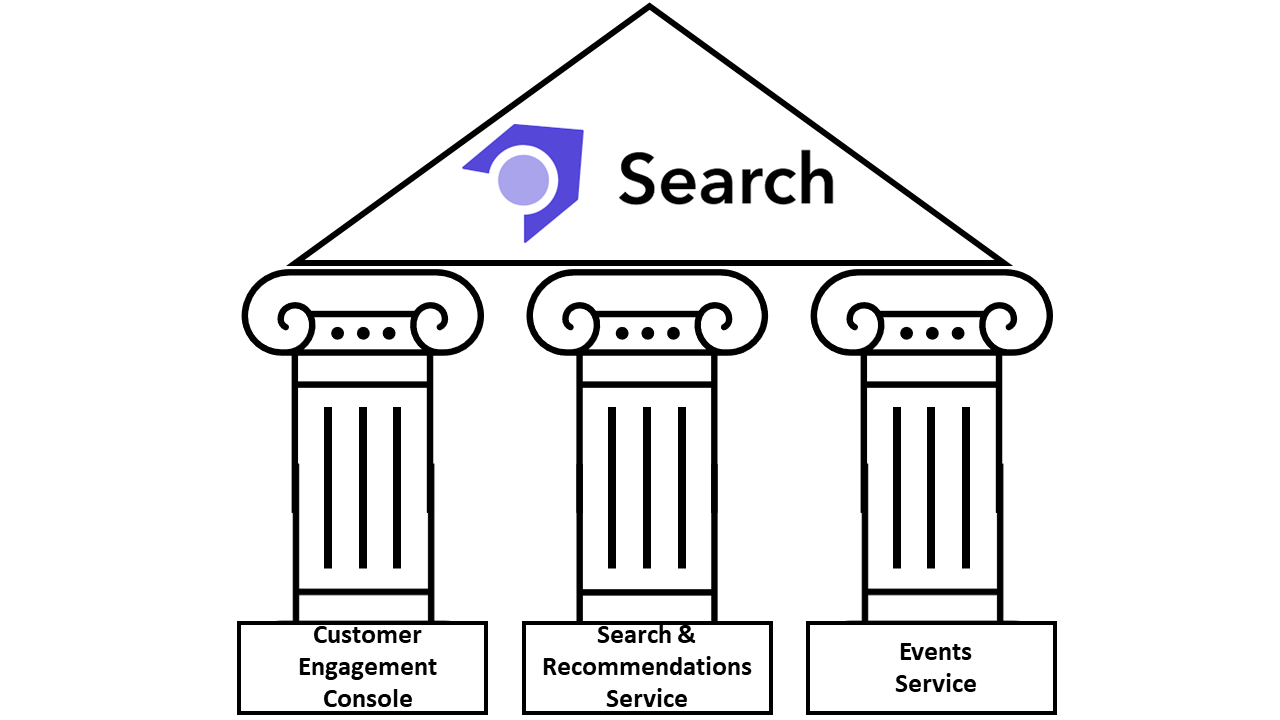
Released during last quarter of 2022, Sitecore Search is one of the most recent products from Sitecore DXP offering. With the newly Sitecore Search product we are able to deliver relevant and personalized content to the right audience at the right time. It’s a fully SaaS-based solution composed by three major pillars:
Customer Engagement Console (CEC) - The Sitecore Search SaaS dashboard for search analytics, tests, configurations, and more.
Search & recommendations service - An AI-based REST API for performing search queries and receiving results.
Event service - A REST API for collecting visitor interactions which are key to optimizing the search experience.
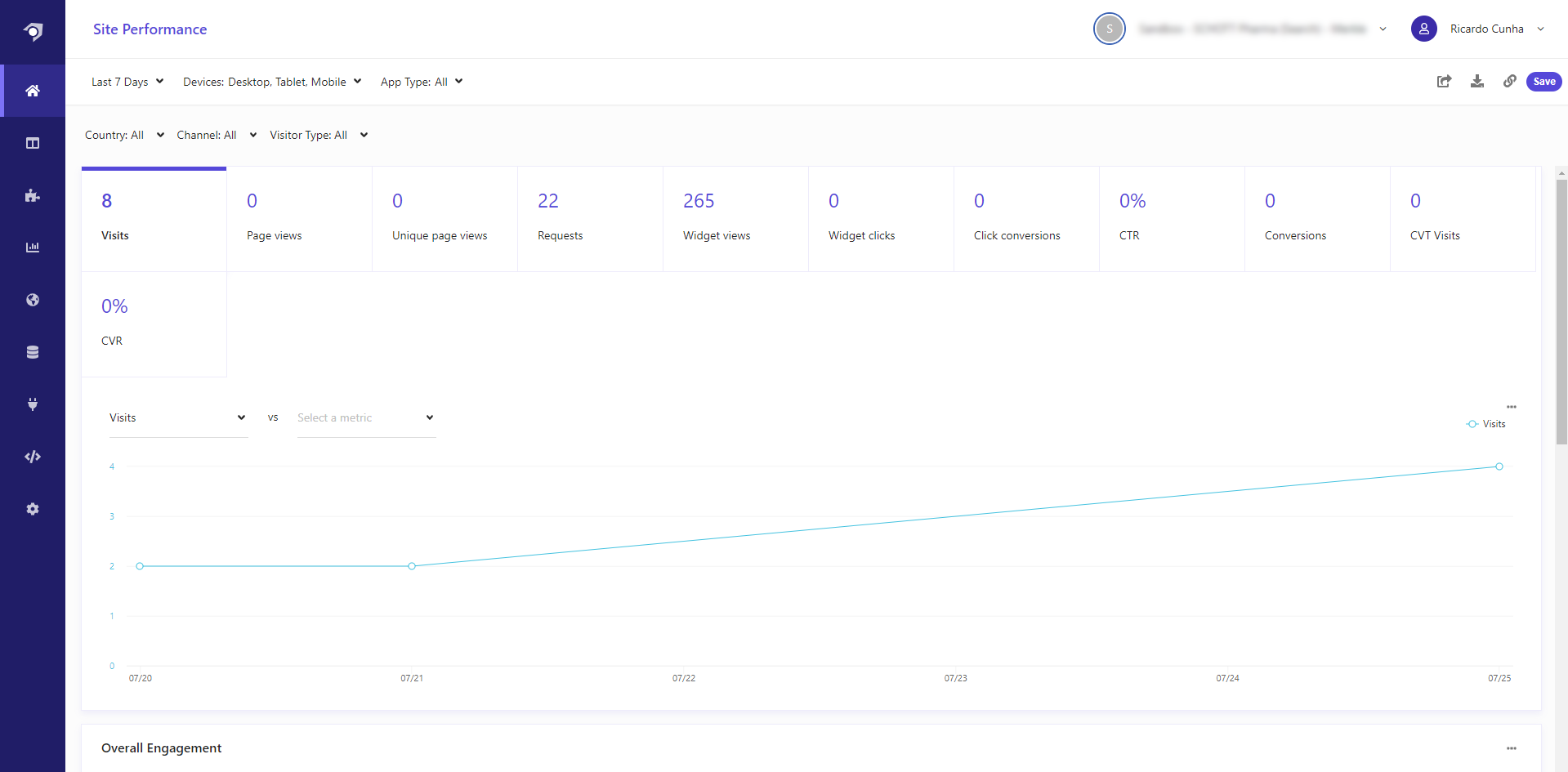
The Customer Engagement Console (CEC) is Sitecore Search entry point, providing us with the right tools to manage, configure and analyze our search experiences. With CEC, we can create Sources, Widgets, rules, A/B tests, track analytics, test integrations and much more.
In current days, where companies are growing and improving their online presence, we are seeing data being fragmented across multiple systems. With Sitecore Search we are able to integrate our website(s) or any online point of contact to create engaging, and predictive content search experiences across all our content sources.
Setup the Sitecore Search environment
While working with Sitecore Search we will mainly go through three major phases:
1. Identify - During the identification step we will need to analyze from where the content is about to be crawled/collected and decide how to store it inside Sitecore Search. Basically we should ask ourselves: how should the schema of our crawled content look like?
2. Collect - After deciding the places from where we are about to collect our data from, we should firstly create our sources and the needed document extractors, secondly add indexed documents to our Sitecore Search Catalog, and thirdly set the scan frequency for our sources.
3. Configure - During the configuration step we should start configuring all website search features we would like to provide to our customers. It’s during this phase that we start configuring facets, sorting options, recommendations and widgets.
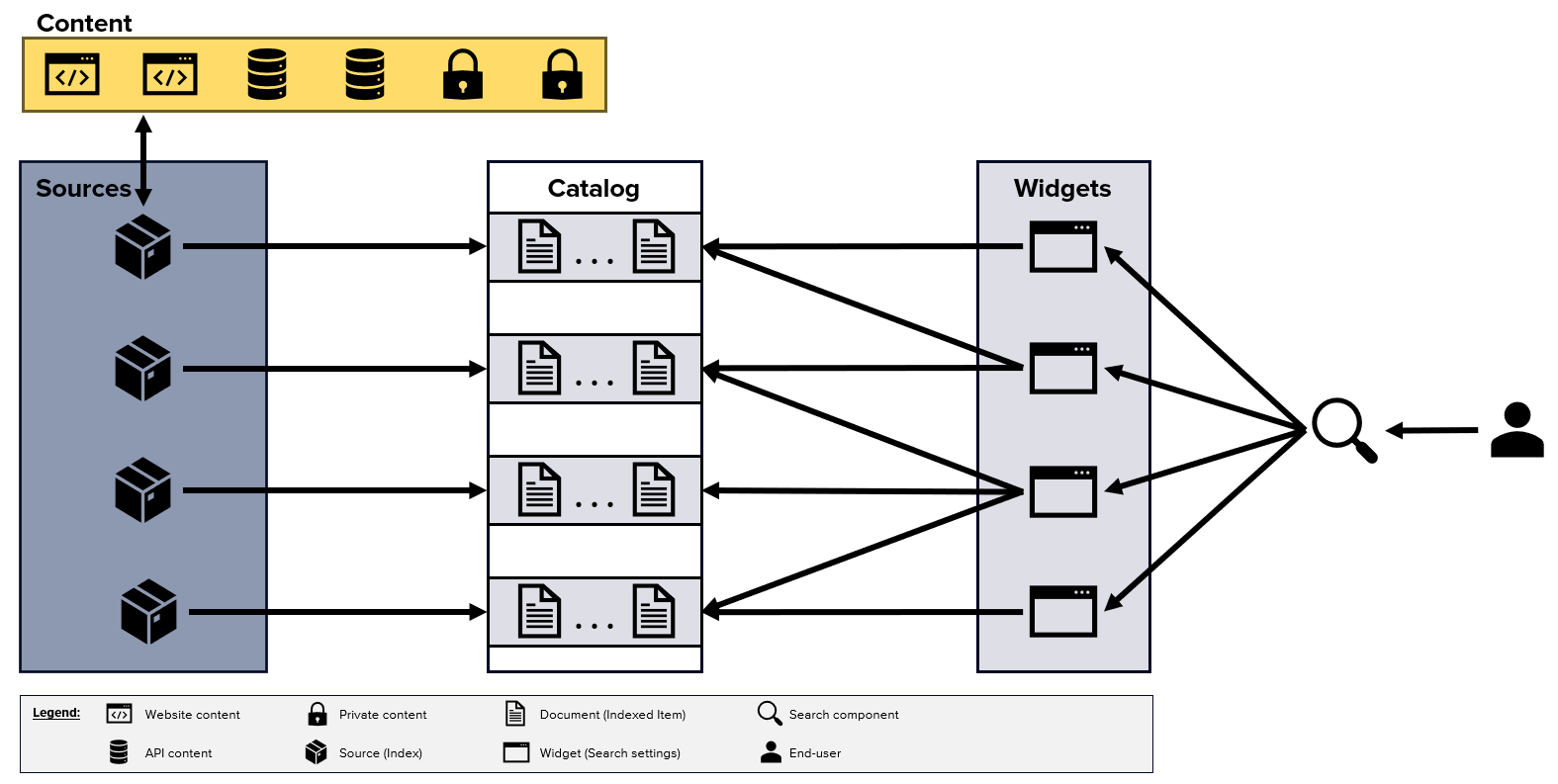
On Sitecore Search, each search experience provided to our customers is attached to a Widget which is represented in Sitecore Search as a unique ID named rfkid. Note that in Sitecore Search, widgets are not coupled with any visual representation.
Instead, we can see them as configuration items that will be used on our search components.
Widgets are a key concept on Sitecore Search, since it’s from them that we can provide unique and custom experiences to our end users. For each widget we can configure different settings, such as pinning or blacklist results, choose which facets to display, boost certain indexed documents and much more.
In this blog post we will explain how to setup Sitecore Search environment, by exploring the following topics:
Adding and configuring attributes.
Adding and configuring sources.
Configuring search features.
Adding and configuring attributes
In Sitecore Search, attributes represent metadata of content items that we can use to generate suggestions, track metrics, filter search results, and so on.
Depending on the sources from which we are extracting content, some attribute fields may or may not be populated. Mandatory attributes are the only ones we must collect on all existing sources. Sitecore Search will not be able to index documents on sources for which mandatory attribute fields are missing.
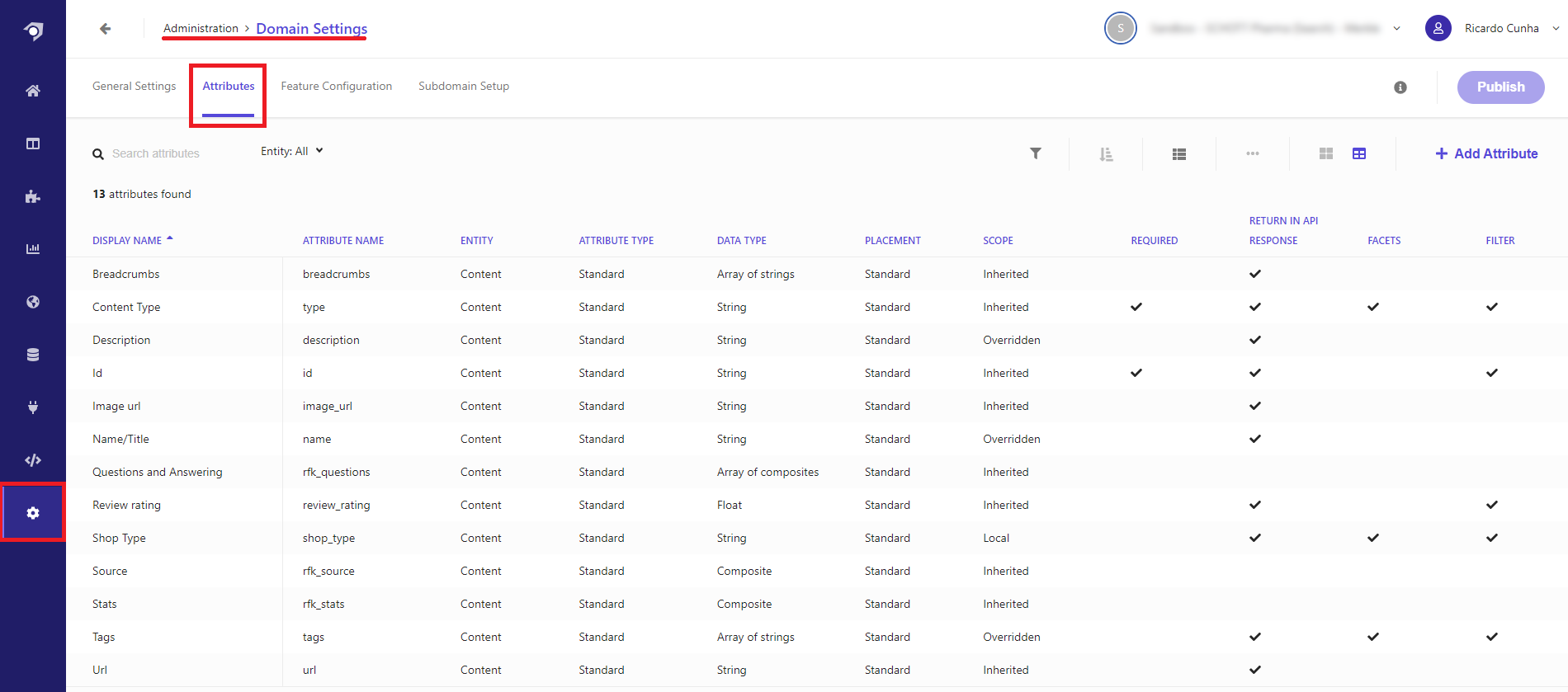
By default, Sitecore Search domain should come with some pre-built attributes such as: id, type, name, description, url or image_url.
The id attribute is an example of a mandatory attribute since each index document requires a unique identifier.
New attributes can be added under the Administration → Domain Settings → Attributes tab. On the attributes dashboard we just need to click on the “+ Add Attribute” button visible on the top right corner of the screen.
An important part of editing or adding an attribute is to configure the “Use for feature” options. In this menu of options we can decide which features of Sitecore Search the attribute can be used for.
For example, by selecting the “Suggestions Blocks” option the attribute field could be used to provide suggestions to end users.
The following list illustrates the possible feature options we can enable on each individual attribute:
Facets
Filter
Personalization
Search ranking
Sorting Options
Swatch
Textual relevance
Suggestions blocks
Note: In order to be able to add new attributes a user should belong to the TechAdmin role.
Adding and configuring sources
In Sitecore Search, we can see sources as search indexes, each one configured to extract information from different locations such as public facing websites, private portals, etc, leading to the creation of several searchable indexed documents.
For each added source we need to configure how content will be crawled/extracted, by setting rules that will assign newly found content to the attributes that we previously defined. When configuring sources we can also set how frequently a source should run in order to update/create indexed documents (scan frequency).
Source Connectors
Currently when creating a source we can choose one of the following connectors:
API Crawler - This source type is used whenever the content can only be accessed by an API endpoint and the endpoint returns JSON.
API Push - This can be useful whenever we need to have a source in which we need total control on how index items are added, deleted or updated. For this type of source we use the Sitecore Search Ingestion API that provide us the necessary methods to update existing indexed documents.
Web Crawler - The basic crawler is useful when the content required to be indexed is available in just one locale/language, and only available thought HTML pages.
Web Crawler (Advanced) - For more advanced use cases, where we would like to store data on different locales and languages, or just to have more configuration options.
Create Source
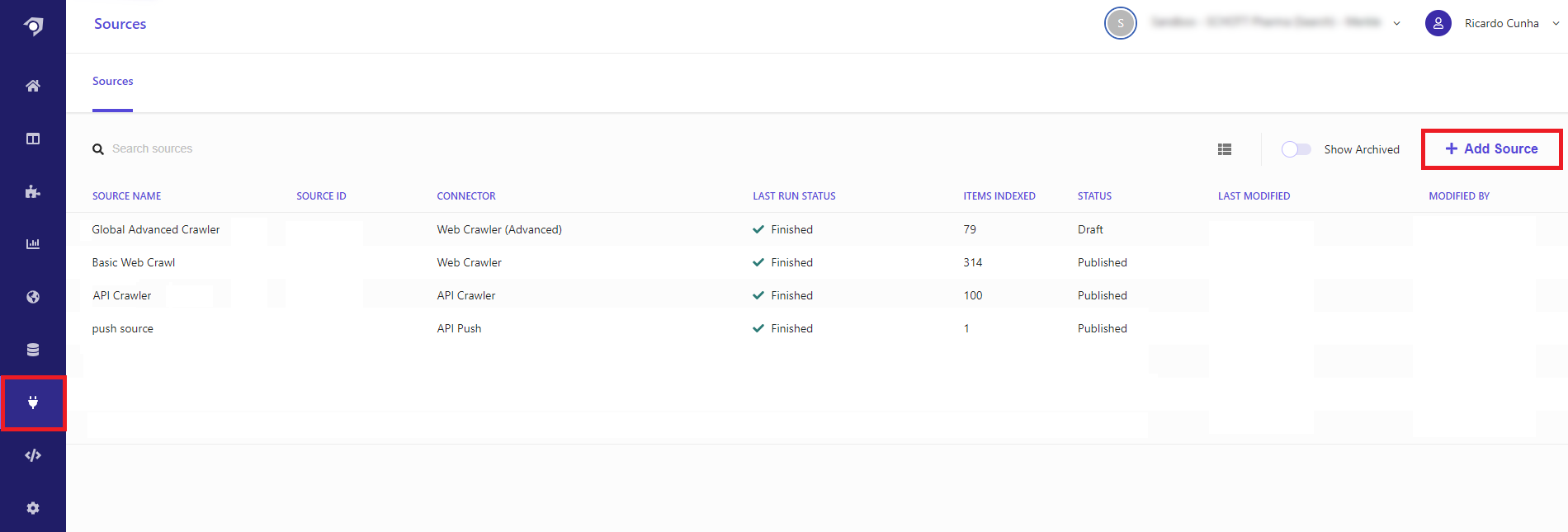
To create a new source, we must go to Sources page and click on the “+ Add Source” button.
After that, we should give it a name, a description and choose which type of connector (from the ones described above) is most suitable for the newly created source.
Configure Source
There are two key concepts we need to understand regarding sources:
Triggers - These are the starting points that a crawler uses to look for content to be indexed. When starting the first data scan or rescan, Sitecore Search starts from the configured triggers.
Document extractors - Group of rules that tell Sitecore Search how content should be extracted and to which attributes (index fields) it should be associated to.
An in depth explanation on how to configure a source can be seen on Sitecore Search documentation page, however there are some key settings important to highlight:
Allowed domains - It’s an important setting to be defined, if no restrictions are applied to the allowed domains you may end by crawling pages that don’t belong to the website search experience you would like to provide. For example you may have a link on one of your pages that points out to an external website and you may end up by adding their page under your index. You can prevent this from happening by properly setting the allowed domains of your source.
Max Depth - Allow us to configure how deep our crawler will crawl our website pages. The crawler will start crawling content from the triggers we configure and will continue to follow links from our pages until it reaches the max depth defined in this setting. For example, with max depth of 3, the crawler would crawl until: trigger_page/level2/level3. The crawler does not open hyperlinks on the last page (level3) because it has reached the maximum depth of three.
Headers - Provide us the possibility of adding custom headers to the requests our crawler will perform while trying to index content. This is an important feature since we can add some custom information mentioning that the requests are coming from our Sitecore Search bot crawler. This could be in hand so that we could tell our analytics dashboard to not show those page requests as page view’s/counts. For example you can achieve this by adding the key/value pairs ‘user-agent’/’sitecorebot’ to your request headers and using that to filter your page views on your analytics dashboards.
Render JavaScript - Be aware of this setting and how your page content is been load. For example, on cases for which you are looking for images pay attention to which attribute you are looking for, you may be looking to a “src” attribute which doesn’t exists on page source and is only shown after lazy loading script was run. Other cases can be related with content been rendered in the page by using API calls (ex. list of articles).
Triggers options - Depending on the type of source we are using, different types of triggers can be set. On an advanced web crawler we can select between sitemap, RSS, Request or JS triggers. From our investigation the one producing better results is the Sitemap trigger, since it clearly state the pages we need to crawl. For example when using a request trigger we may up by crawling a page of a third party website that we were not excluding when setting our allowed domains. It can also happen that with a request trigger, pages that are producing 404, 403 or 500 errors are been reached by the crawler which can prevent the crawler to properly finish his task.
Document extractors options - We can extract content to be added to our attributes in different ways. Depending on which source type we are configuring we may choose between JS, CSS, Xpath or JSONPath extractors. The JS extractor makes use of Cheerio JS, a subset of jQuery implementation used to parse and manipulate HTML and XML. Before updating or running any JS document extractors, we may use this cheerio testing website which allow us to test our scripts against any HTML snippet.
Configuring search features
While configuring attributes we can set to which Sitecore Search features they can be used for, however that doesn’t mean those features will be automatically available whenever we configure a specific attribute. When configuring attributes, we are saying that a specific attribute can be used for a specific search feature (we are not configuring that feature on Sitecore Search).
Note: For facets and filters, no further configuration is needed. They are automatically available when we set attributes to be used as facets or filters. For other types of features like suggestions, sorting or textual relevance, further configurations are required.
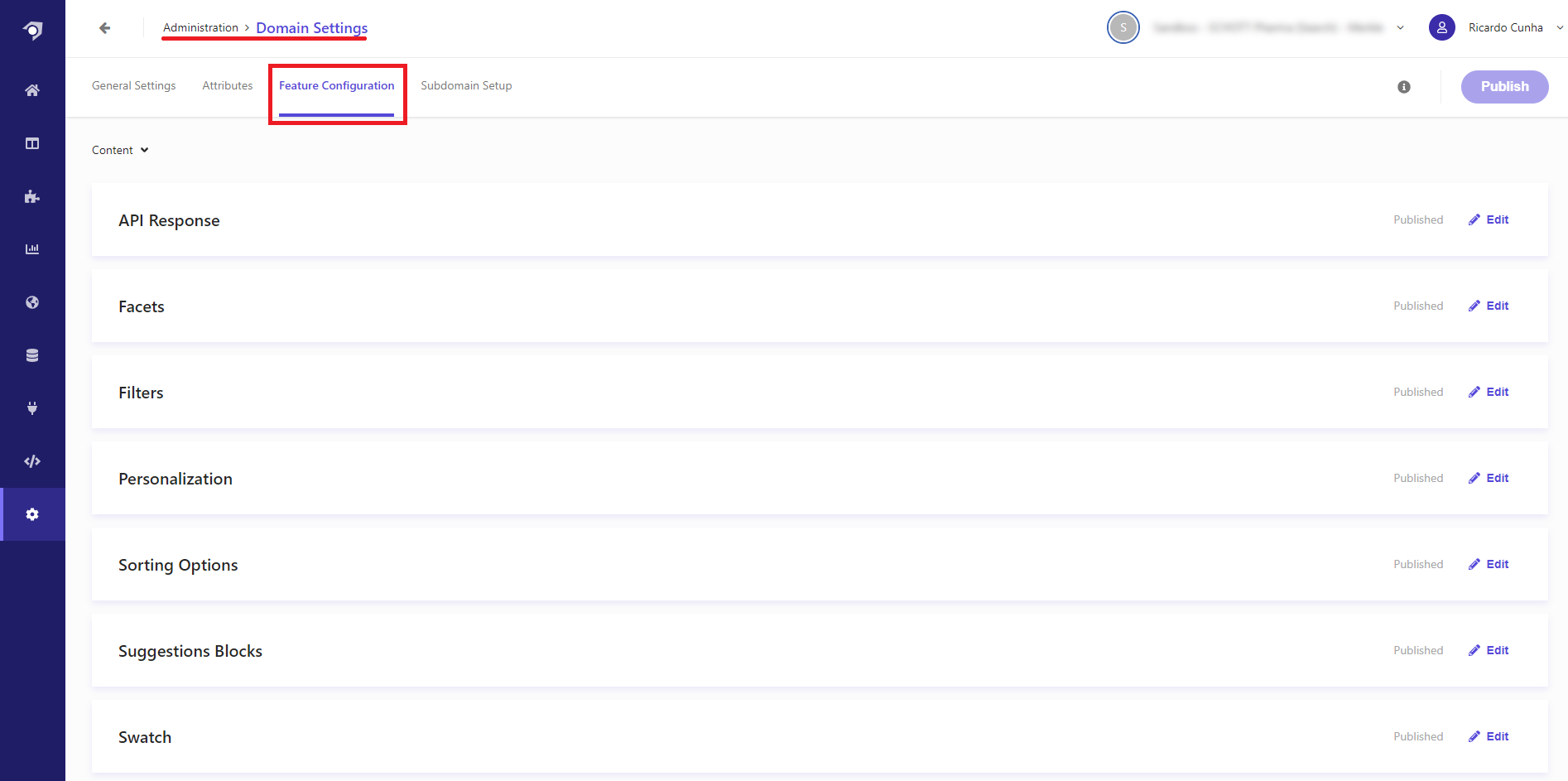
In order to enable search features such as facets, sort options or suggestion, we need to navigate to the Feature Configuration panel located at: Administration → Domain Settings → Feature Configurations.
An example on how to configure search features like textual relevance, suggestions and sorting options can be seen in this page.
After configuring all the necessary features, we can navigate to the Global Widget page under Global Resources section, and define the default facets, sorting options, textual relevance settings that by default all widgets will rely on.
Even though configurations were added to the global widget, Sitecore Search gives us the flexibility of changing them on each individual widget we have. These changes can even be done based on site or visitors context. For example we can have different configurations based on the country location from which the user is located at.
Key Takeaways
In a short period of time we can quickly configure a powerful search platform.
Sitecore Search can provide customers with a search experience that groups together content that is fragmented thought-out multiple sources (global public website, shop website and APIs). With a single user query we can aggregate the results of all configured sources in a single data set that is returned to the user, enabling him to find content quickly and easily.
Sitecore Search provides developers with an existing API to get search results, facet options, suggestions, sorting options etc. No need to create custom APIs, it’s all provided by Sitecore Search.
Sitecore provides a Search JS SDK for react that we can use to accelerate the integration between Sitecore Search and your website.
Coding wise, the effort needed to have this available in a website is mainly frontend code which can make use of existing Sitecore Search rest APIs or using the new Sitecore Search JS SDK.
Currently there is no way to access system logs, meaning that whenever the crawler is not able to run the only option we have is to tweak existing configurations to see if it fixes the issue.
Ingestion API allow us to manually add/remove/update indexed documents, however currently there is no bulking option to update multiple documents at the same time. We need to do it one by one.
Interested in diving deeper into this or any other Sitecore topic? We’d love to share more about Merkle and our expertise with Sitecore! Don’t hesitate to contact with us through this link! We’re eager to connect and share insights with you.
]]>rcunhaSitecore 10 Upgrade Problems And Solutions2024-01-15T11:00:00+00:002024-01-15T11:00:00+00:00https://sitecore.merkle.com/sitecore-10-upgrade-problems-and-solutions
After upgrading from Sitecore 9.1 to Sitecore 10.3 like many people, we faced bugs and some features stopped working for us. In this post, I will try to list some of them and explain how we fixed them.
Problem: Sitecore forms list fields stopped showing values of list items in local languages
We use local languages and they have a fallback to the main languages. Such as; en-gb to en, de-de to de.
We realized after the upgrade, that any field that is based on list fields started showing item names on these local languages instead of translated ones for them. So we opened a ticket to Sitecore Support and asked for a solution. Sitecore Support registered this behavior as a bug in their bug-tracking system and gave us a reference number 602361 for tracking.
Solution
As a workaround, they suggested either not using a fallback mechanism on form fields and creating versions on local languages or using ListDataSourceProvider from Sitecore 9.
We went with the second option as we had many forms in many languages. So we patched Sitecore 9 ListDataSourceProvider over Sitecore 10:
<?xml version="1.0" encoding="utf-8"?><configurationxmlns:patch="http://www.sitecore.net/xmlconfig/"xmlns:role="http://www.sitecore.net/xmlconfig/role/"><sitecorerole:require="Standalone or ContentManagement or ContentDelivery"><services><registerpatch:instead="*[@serviceType='Sitecore.ExperienceForms.Mvc.DataSource.IListDataSourceProvider, Sitecore.ExperienceForms.Mvc']"serviceType="Sitecore.ExperienceForms.Mvc.DataSource.IListDataSourceProvider, Sitecore.ExperienceForms.Mvc"implementationType="ProjectName.Foundation.Forms.ExperienceForms.Mvc.DataSource.ListDataSourceProvider, ProjectName.Foundation.Forms"lifetime="Transient"/></services></sitecore></configuration>
Similar Problem: Form submissions are not working in local languages
On our website, we use custom submit actions to make API requests. These API requests rely on data source items selected on Sitecore. After testing, we realized that some fields on these data source items have empty values sent to API even though they were filled on the main languages on Sitecore. So Sitecore could not fill these values that are supposed to come from fallback language.
Solution
After opening another Sitecore support ticket, we realized that Enable item language fallback and Enable field language fallback checkboxes were not checked on site items. In the Sitecore 9 version, there was no checkbox and we were using the Other Properties field. That’s why the problem occurred. You can check the following documentation from Sitecore here
link
For these 2 problems thank you for your support, Arun Tiwari…
Problem: Form field classes are not rendered
After the upgrade, all of our forms were not showing CSS classes. Since they are added to the project for custom implementations, they were not changed by upgrade automatically.
Solution
In Sitecore 9, Model.CssClass for fields and Model.LabelCssClass for labels was used. These properties become obsolete in Sitecore, so we needed to use Model.CssClassSettings.CssClass and Model.LabelCssClassSettings.CssClass respectively. After these changes, forms were rendering CSS classes again.
Similar Problem: Forms Editor is not showing the Styling section on custom form fields
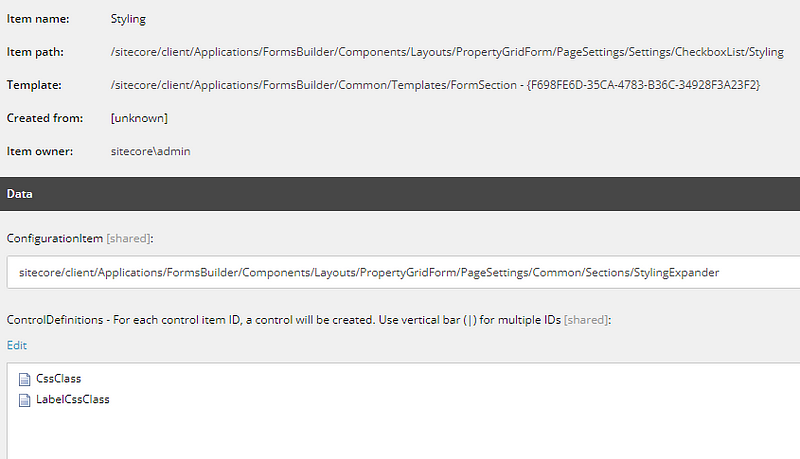
In Sitecore 10, there was another change for each form field on the core database. Sitecore started using new CssClass and LabelCssClass items on Styling item:
Solution
Even though item names are the same, there are different items selected in Sitecore 10. You can put the following IDs on the ControlDefinitions field on Sitecore for each of these custom fields, then we will be able to see CSS classes on Sitecore Forms Editor:
Problem: Missing field values after Glass Mapper upgrade
After the upgrade, we realized there were many field values not showing on the website. All of these fields had one thing in common. Their properties did not have setters on class entities. But all of them were working fine before the upgrade.
Solution
We searched on Glass Mapper release documentation and found this one:
Glass Mapper on version 5.3.17 which mentions:
ISSUE 370 The lazy object inceptor will now ignore class properties that don’t have a setter or have the SitecoreIgnore attribute.
So, after upgrading the Glass Mapper, checking if every property mapped with the Glass Mapper has a setter is crucial. Especially, if you use them for API calls or search functionality.
Problem: Custom Powershell scripts on the Toolbar are not working
In our project, we used Powershell scripts to bulk edit workflow state, copy item version, reset field value, and many more. We created these scripts and added them to the Toolbar so our customers can use them too. But after upgrading to Sitecore 10, we saw that all of them were not clickable, showing just script names and blank icons.
Solution
After some investigation, we rebuilt all Powershell ISE scripts. This rebuild created some changes on items. But mainly on items that represent each script on the core database had a different type now:
Spe.Client.Controls.ContentEditorRibbonPanel,Spe
Before they had the following value on the type field:
So after we start using the updated type, scripts become clickable and icons are showing again.
Problem: Fast Queries are not supported
Fast queries are deprecated in Sitecore 10. It’s suggested to use a search index. In our case, we used a fast query to reach a setting item.
Solution
We developed a custom SettingProvider and started using it instead of queries or search indexes.
Problem: System.OutOfMemory Exception
After we switched to Sitecore 10 with Docker and imported the databases from the production system, several developers in the team experienced this exception.
Either cm was unhealthy, or after some time it was becoming unhealthy. When we check logs on the docker or inspect the container, we would always see this error popping up. Also, the Sitecore system needed to be faster to work on.
Solution
We first checked how much each container consumes when docker is started with the following command:
docker stats
Thanks to this command, we could see that the SQL server is using way more than usual. We have seen values like 10–20 GB. We tried changing the mem-limit for each container to find the combination that works but that was barely enough. Sitecore was again too slow. We also tried deleting the whole data on the preview database, since it was not needed on our locals, but that was also not enough.
Then we realized something golden. EventQueue and PublishQueue tables in the master, web db had over 405k entries on them. So we started a cleanup using the following SQL:
After this cleanup docker became fast, and we got rid of the exception.
Thanks to Fabian Geiger and Ramazan Yilmaz for their support…
]]>tcanyalcinEXM campaign dispatch stopped because of contacts missing the Alias identifier2024-01-09T07:00:00+00:002024-01-09T07:00:00+00:00https://sitecore.merkle.com/exm-campaign-dispatch-queued
Situation
It is how it mostly is - marketing team putted all their efforts together to send out a very important press release to over 8000 recipients at a particular time and date - and during the dispatch - this regular campaign type paused and was set to queued without any information or indicator about what went wrong to the marketing team.
Campaign Manager
We saw the status is Queuing, the columns Sent to, Skipped, Unprocessed and Failed showed all a 0 so we felt lucky and thought that this was just a hiccup maybe because of the huge amount of contacts and we reset the status, tried to send it out an another time - after some 2 or 3 minutes - same issue again.
Reporting mail
Astonishment arose when the customer provided one of the received reporting mails:
O man, there are really contacts which already received these mailings, but the majority not. So, the numbers on the overview within the Campagne Manager are not true in this case.
This all happened on a Sitecore XP 9.1.1 CM instance, what at the end of this post gets important again.
Troubleshooting
10776 10:35:21 ERROR Exception: System.NullReferenceException
Message: Object reference not set to an instance of an object.
Source: Sitecore.EmailCampaign
at Sitecore.Modules.EmailCampaign.Core.Dispatch.DispatchQueueItemDataReader.GetValue(Int32 i)
at System.Data.SqlClient.SqlBulkCopy.GetValueFromSourceRow(Int32 destRowIndex, Boolean& isSqlType, Boolean& isDataFeed, Boolean& isNull)
at System.Data.SqlClient.SqlBulkCopy.ReadWriteColumnValueAsync(Int32 col)
at System.Data.SqlClient.SqlBulkCopy.CopyColumnsAsync(Int32 col, TaskCompletionSource`1 source)
at System.Data.SqlClient.SqlBulkCopy.CopyRowsAsync(Int32 rowsSoFar, Int32 totalRows, CancellationToken cts, TaskCompletionSource`1 source)
at System.Data.SqlClient.SqlBulkCopy.CopyBatchesAsyncContinued(BulkCopySimpleResultSet internalResults, String updateBulkCommandText, CancellationToken cts, TaskCompletionSource`1 source)
at System.Data.SqlClient.SqlBulkCopy.CopyBatchesAsync(BulkCopySimpleResultSet internalResults, String updateBulkCommandText, CancellationToken cts, TaskCompletionSource`1 source)
at System.Data.SqlClient.SqlBulkCopy.WriteToServerInternalRestContinuedAsync(BulkCopySimpleResultSet internalResults, CancellationToken cts, TaskCompletionSource`1 source)
at System.Data.SqlClient.SqlBulkCopy.WriteToServerInternalRestAsync(CancellationToken cts, TaskCompletionSource`1 source)
at System.Data.SqlClient.SqlBulkCopy.WriteToServerInternalAsync(CancellationToken ctoken)
at System.Data.SqlClient.SqlBulkCopy.WriteRowSourceToServerAsync(Int32 columnCount, CancellationToken ctoken)
at System.Data.SqlClient.SqlBulkCopy.WriteToServer(IDataReader reader)
at Sitecore.Modules.EmailCampaign.Core.Data.SqlDbEcmDataProvider.AddToDispatchQueue(Guid messageId, MessageType messageType, IEnumerable`1 recipients, Dictionary`2 customPersonTokens, Dictionary`2 customQueryStringParameters)
at Sitecore.EmailCampaign.Cm.Dispatch.DispatchManager.Queue(Int32 threadIndex, IEntityBatchEnumerator`1 recipients, Int32 abTestRecipients, DispatchNewsletterArgs args, Int32 enqueueBatchSize)
What we found out
First, we were not sure how this error message is related to the stop of the email campaign dispatch.
NullReferenceException - what could be missing?
We continued with our investigation and involved Sitecore Support which told us to check if we have contacts in the included lists which have a missing Alias identifier.
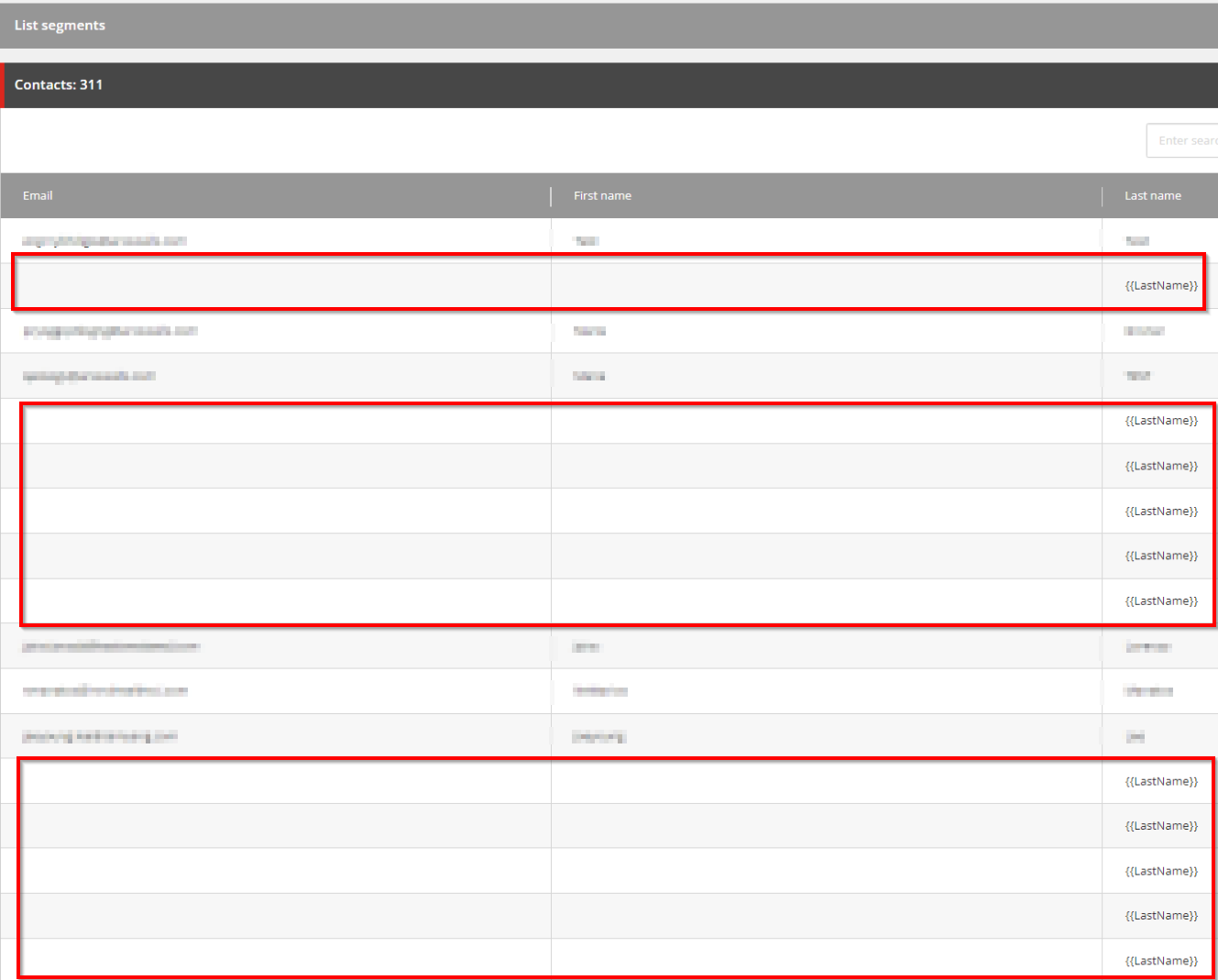
So, we checked all included contact list about these contacts and we found what we were looking for:
There was an included segmented list where contacts are displayed in the List Manager without Email, First Name and Last Name was outputted as Therefore, if you see such contacts in your lists please do not ignore them.
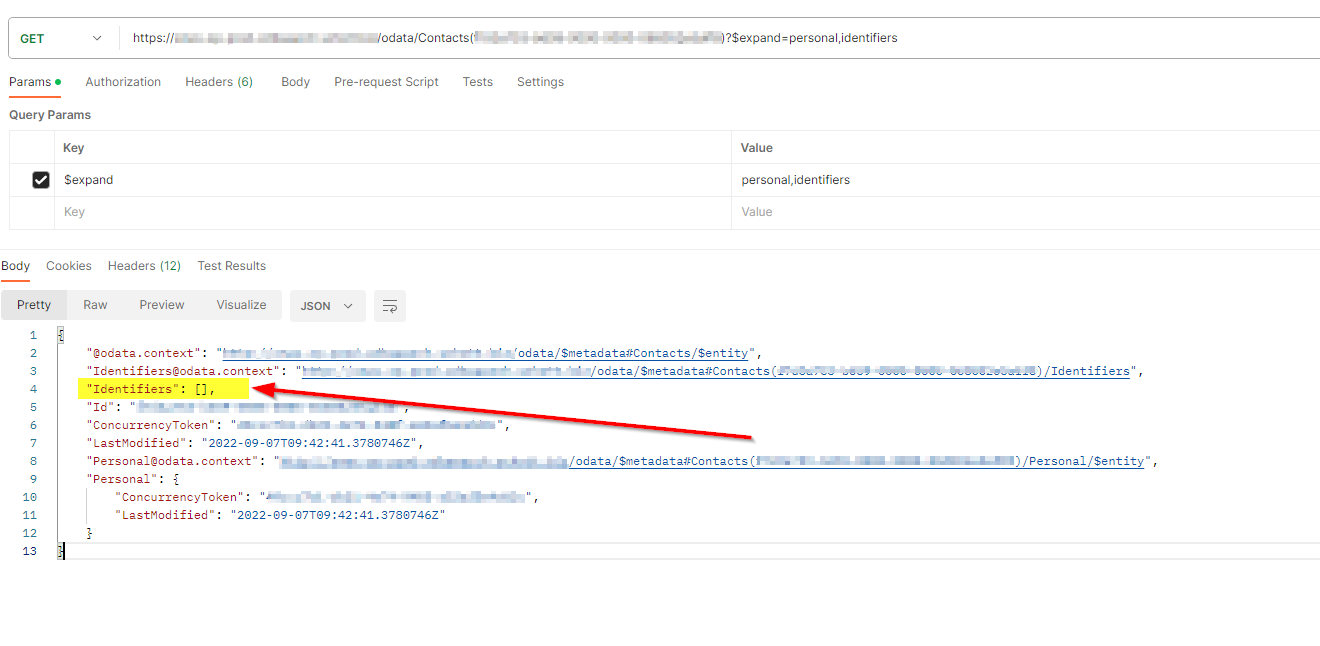
With double-click on one of those, we entered the Experience Profile for this contact and with the contact ID we were able to check the identifiers directly in the XDB with utilizing the xdbsearch Role:
Here you can see that these contacts have no identifiers and personal information at all, how that came we still need to investigate but these seem to be very old contacts with no interactions since more than a year.
Solution
Sitecore support have advised there is no supported way to programmatically add the Alias identifier and the best option is to manually delete and recreate these contacts. But we had no time now - the mail must go out now.
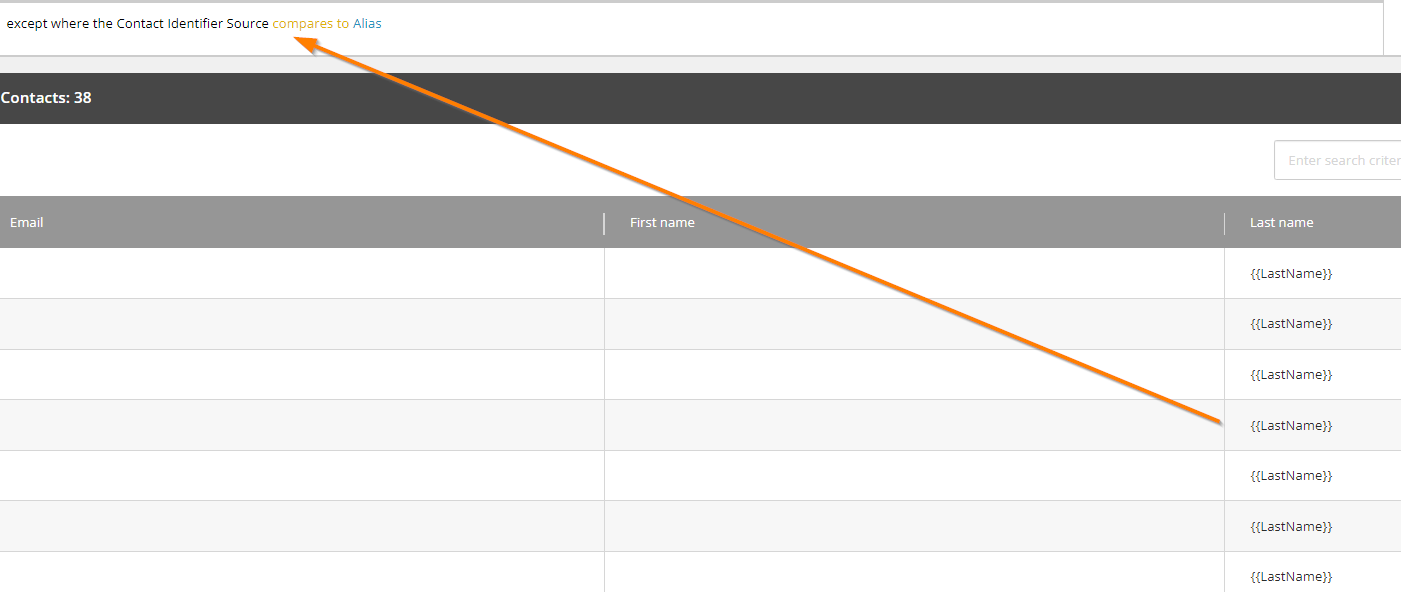
So, we checked all available segmentation rules and conditions to filter against these corrupt contacts without Alias identifier.
After these contacts were filtered out from the contact lists the campaign dispatch ran through and the send-out finished successfully
A ray of hope - Sitecore 10
On Sitecore 10.3 this issue will not occur anymore, we found out that these contacts with no Alias identifier do not appear anymore on the segmented list. Maybe this was already a known issue and has been fixed with the upgrade.
For older versions I suggest filtering these contacts out in your segmented lists + delete or recreate these contacts afterwards
]]>dgashiHow to add a custom unlock button to the Content and Experience Editor2024-01-03T07:00:00+00:002024-01-03T07:00:00+00:00https://sitecore.merkle.com/adding-unlock-button-to-content-and-experience-editor
How to add a custom unlock button to the Content and Experience Editor
Most Sitecore developers know this request already.
We do not want everyone to be an admin, but editors should still be able to release the editing lock in case a colleague is on leave and has an item locked.
Because this is a recurring request, I have seen on multiple projects by now, I wanted to write down this step-by-step guide, how to add a custom unlock button to the Content Editor as well as the Experience Editor. I assessed this solution on Sitecore version 9.3.
The challenges
First challenge is, that the unlock functionalities, which come with Sitecore out of the box are only usable by administrators and it is not possible, to make them available by making changes within the Security Editor in Sitecore.
Second challenge is, that the UIs of the Content Editor and Experience Editor are implemented in two separate ways, so we need to customize our solution according to the different contexts.
These challenges we can overcome with the following three steps:
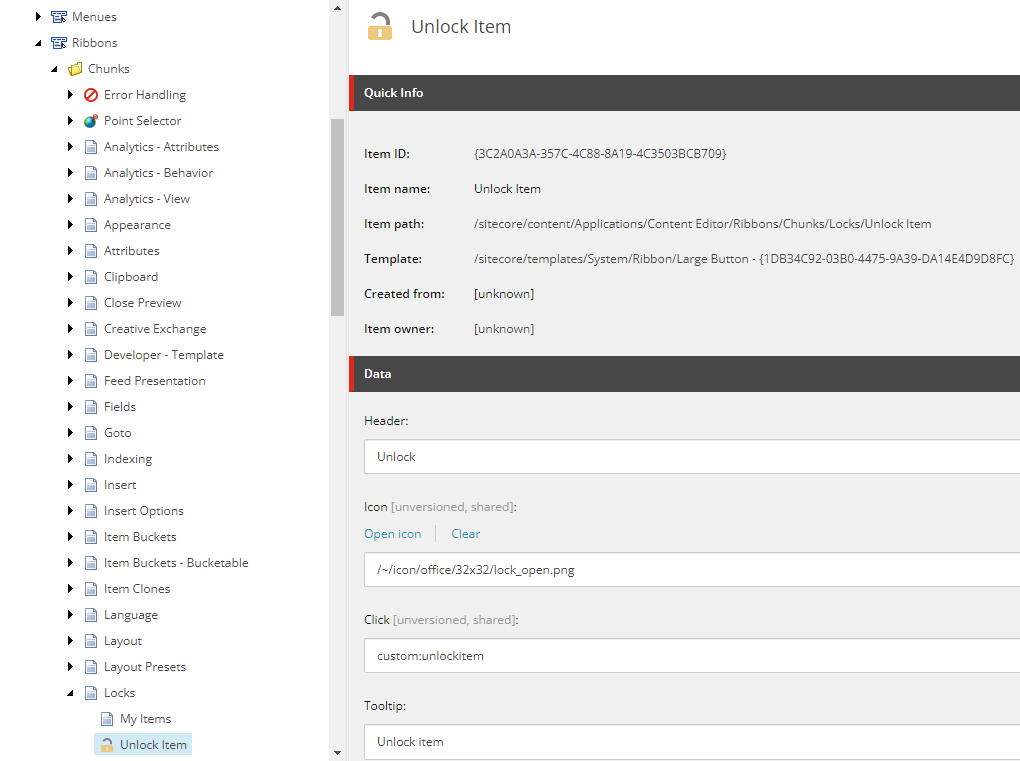
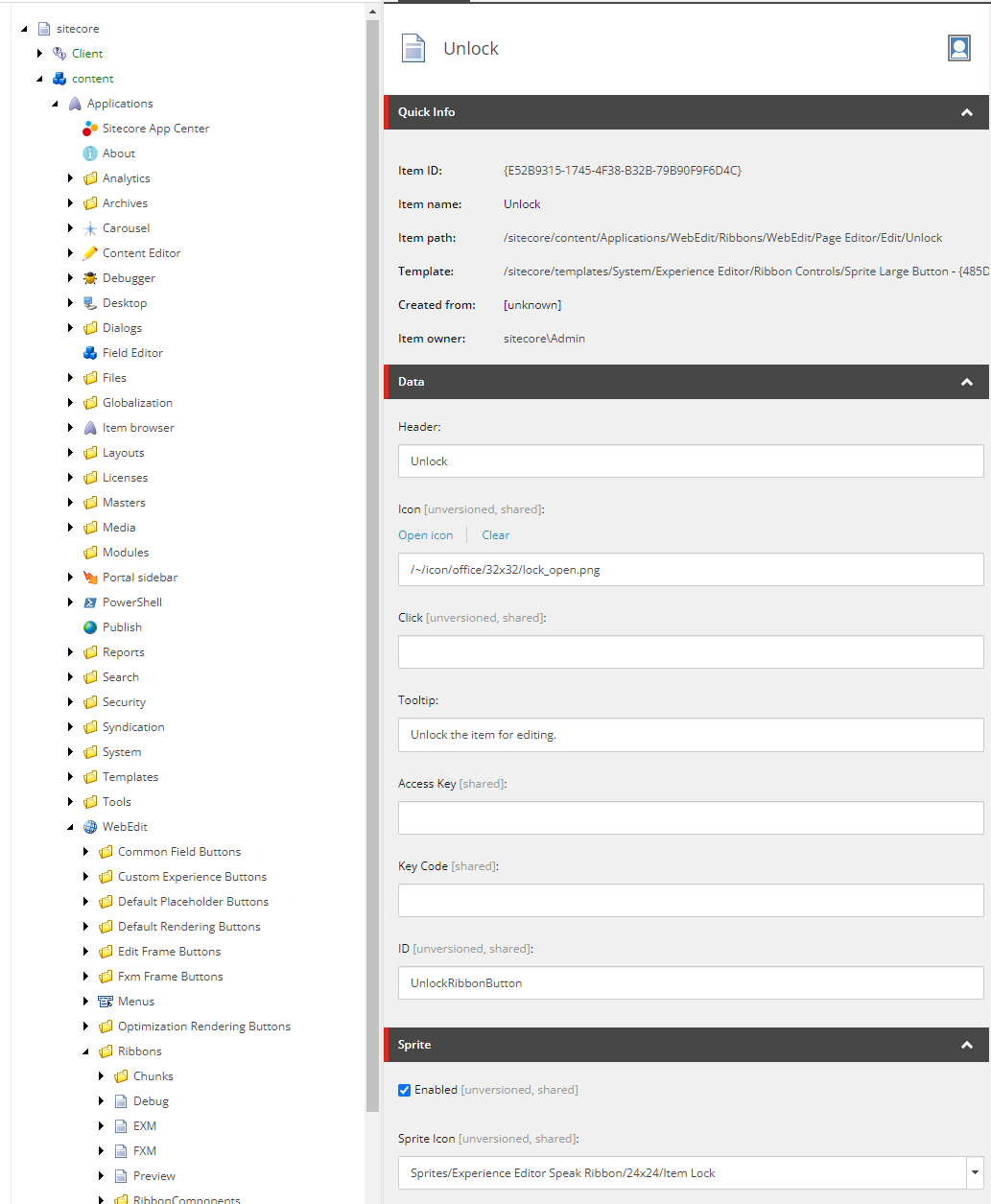
First, we create a new button again in the core database. Within the folder /sitecore/content/Applications/WebEdit/Ribbons/WebEdit/Page Editor/Edit/Unlock we duplicate the item called “Lock” and name it “Unlock”. By duplicating the existing button, we do not have to completely recreate the presentation details.
We configure the button like this:
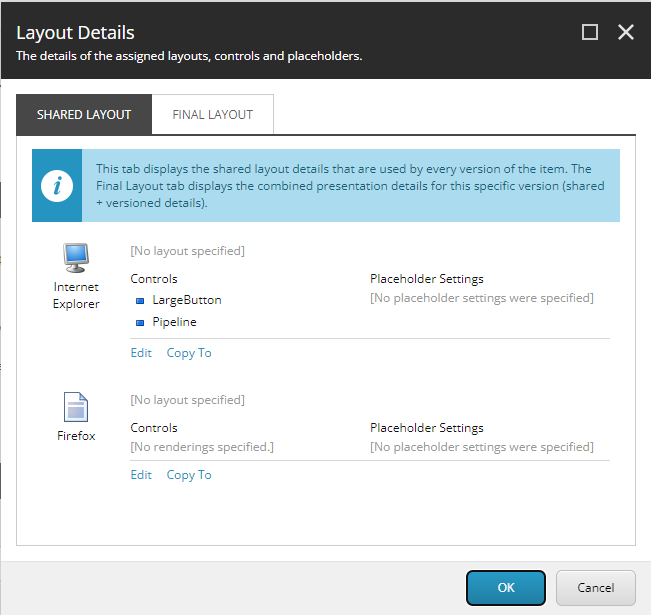
Next, we open the “Presentation Details” and click on the LargeButton rendering:
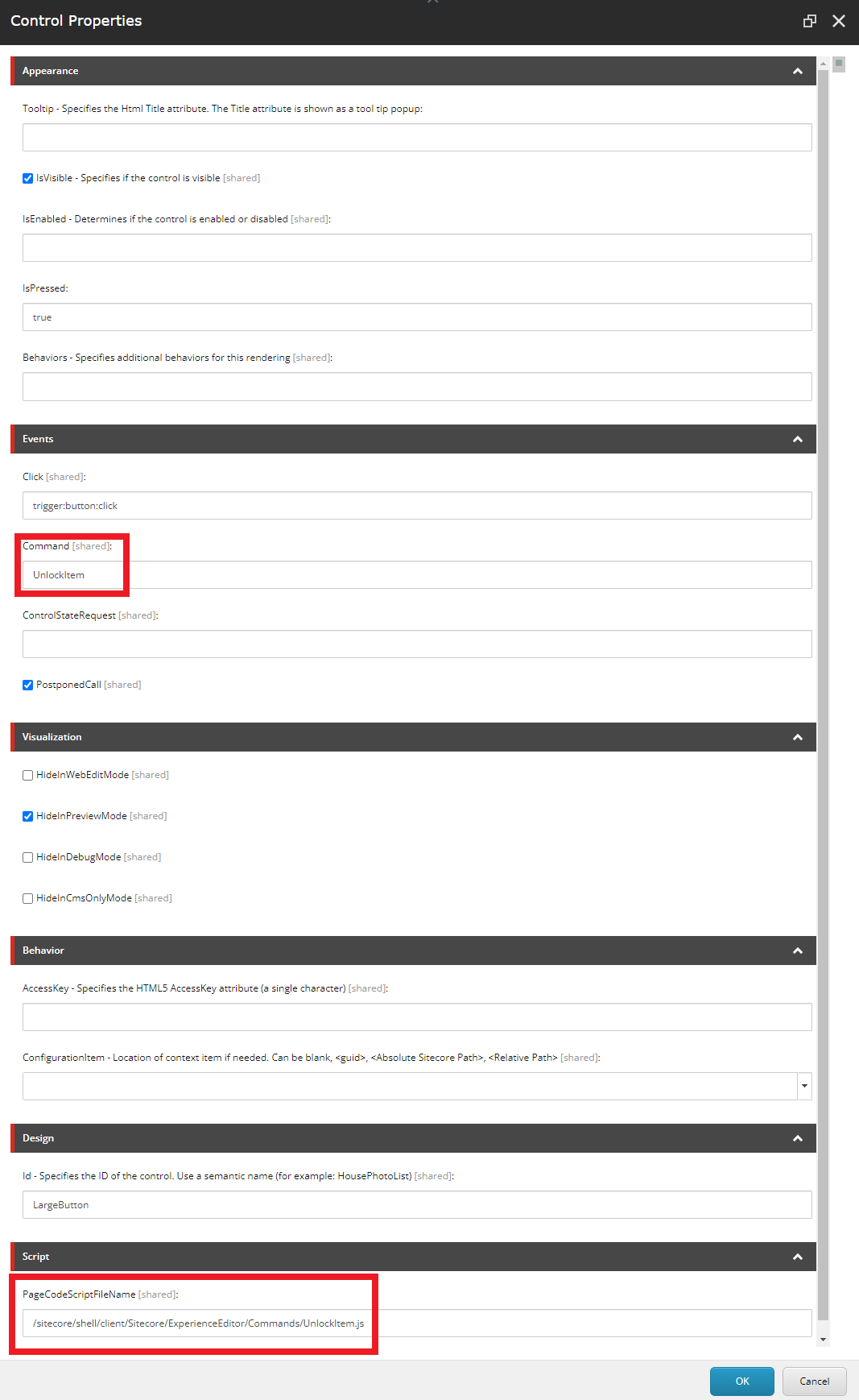
The Control Properties of the LargeButton we change according to this:
Take note of the path in “PageCodeScriptFileName”: /sitecore/shell/client/Sitecore/ExperienceEditor/Commands/UnlockItem.js and the “Command”: UnlockItem.
Next, we will create the script, which is triggered, by clicking the button in the Experience Editor.
Within the command we can utilize the scForm object to invoke the command, that we created in step 1.
In our solution we create a new JavaScript file under the same path, that we configured previously in the Control Properties: /sitecore/shell/client/Sitecore/ExperienceEditor/Commands/UnlockItem.js.
define(["sitecore"],function(Sitecore){Sitecore.Commands.UnlockItem={canExecute:function(context){// Determines whether command is disabled or enabled.// For the purpose of this post we ignore this checkreturntrue;},execute:function(context){scForm.invoke("custom:unlockitem");}};});
Notice, that the Sitecore.Commands.UnlockItem name matches the “Command” field from the Control Properties of the unlock button.
Step 4 - Enjoy your newly won flexibility :-)
Now we have the unlock button available both in the Content Editor as well as the Experience Editor.
I recommend introducing an additional role, that users require to see this button. This way we can easily configure, which users should have the ability to just unlock any arbitrary item within the CMS.
]]>shauckHow I corrupted the database with the ‘shared’ checkbox2023-12-14T07:00:00+00:002023-12-14T07:00:00+00:00https://sitecore.merkle.com/how-i-corrupted-the-database-with-the-shared-checkbox
How I corrupted the database with the ‘shared’ checkbox
Last week I got a request from our customer, that images should be maintainable individually for each language version. Until then, images were shared between versions. But the field came from a base template so it was only one field, that needed change.
I assumed, that shared value would simply become the value for all versions, after unchecking the “shared” flag.
“Easier done than said” I told them and I made the change … on production.
Cue the chaos
After some time we realized, that this had some unwanted side effects.
Items, that had and English and a German version had kept the value, but only for the English version
Items, that only had a German version had lost the value completely
This meant, that almost all images were gone from the website, because most items inherited their image field from said base template.
Luckily we are able to retrieve previous backups of the database but in the meantime authors have already created new campaigns and content so I wanted to avoid a complete rollback.
This script will retrieve the English version of the Image field for every item. If the field has a value, it is written to the German version as well.
This fixed my problem at least for all the items, that had an English version.
The next one was more of a challenge.
Restore from database backup
Here I had some hit and miss approaches but the following ended up doing the trick.
First my awesome DevOps colleague restored an older state of the Master database, that had not suffered yet from my unthoughtful actions.
With MS SQL Server Management Studio I connected to the database and ran the following query to retrieve all values of the Image field and the ItemId, they belong to:
This script goes through all rows of the ItemIds and Image values, retrieves the German version of the item and then sets the value for the Image field.
And with that, all images were back in their place :)
Conclusion
Afterall the fix was quite straightforward, but still took me almost two days to figure out all the neccessary steps. So maybe these scripts will save someone elses time in the future.
My takeaways:
Even one checkbox can have a severe impact.
Never make changes directly on PROD (who would have thought).
Make a backup package before you make any changes.
Are you annoyed by unrecognized UI changes? Are you still wasting time making sure your changes are not crashing something? Use BackstopJS as an option to improve your regression testing process locally and in your CI/CD process. We tried it out and developed this application that now makes our lives easier.
Usage of BackstopJS
BackstopJS runs through a predefined list of pages on a website, takes screenshots, and compares these screenshots to highlight any changes. It can be run locally and can be easily integrated into a pipeline.
Local usage
Installation
Open a command prompt and type the following command, to install BackstopJS globally:
npminstall-gbackstopjs
After installing, you have to close your command prompt and reopen it, so you can use the backstop commands.
Initialization
First, you have to initialize Backstop. This command will create all the files you need for the test run later.
backstopinit
Adding pages
The pages are configured in the generated backstop.json file. You can add your pages as scenarios in that JSON file. It is also advisable to adjust the delay to give the tool some time before the screenshot is taken so that the page with images has loaded completely.
Most websites have a cookie-consent overlay that blocks large parts of the page. To prevent this from appearing on the screenshots, there is the cookies.json file, which was generated under the path .\backstop_data\engine_scripts by the Init command. Update the file with the cookie values of your test page.
You need to make an initial run so that you have screenshots for later comparison.
backstoptest
This creates a folder with the screenshots under .\backstop_data\bitmaps_test
Approve
After the screenshots have been taken, the status must be approved and used as a reference for the subsequent screenshots.
backstopapprove
Test run
With a new test command, the previously created screenshots are compared with new ones and an analysis is made.
backstoptest
Interactive test report
After the test has been run, the index.html from .\backstop_data\html_report is opened and the results are visible.
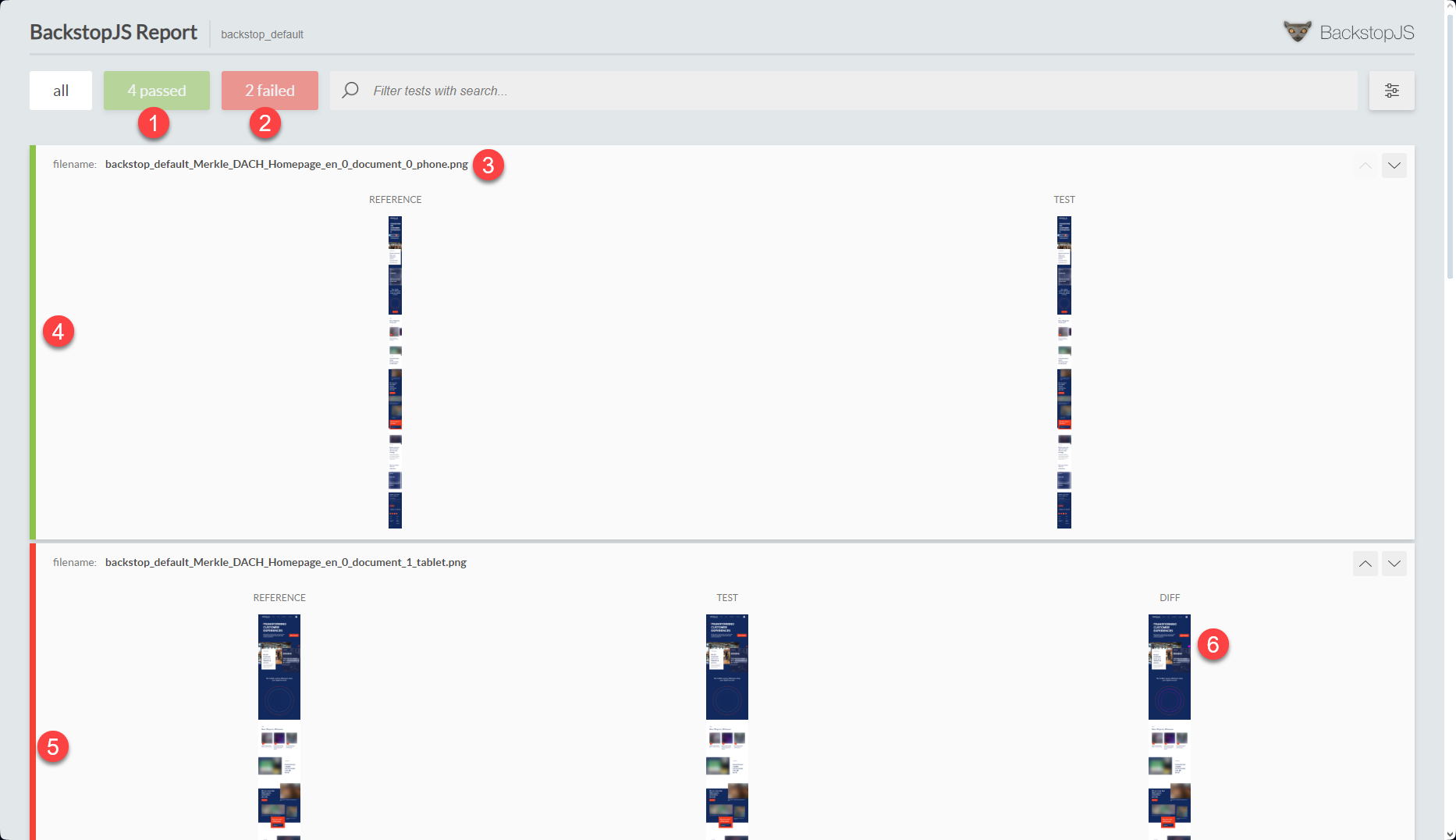
4 tests passed
2 tests have failed
First defined entry “Merkle DACH Homepage en” with “phone” resolution
Green bar for passed tests
Red bar for failed tests
Diff with errors marked (click on it)
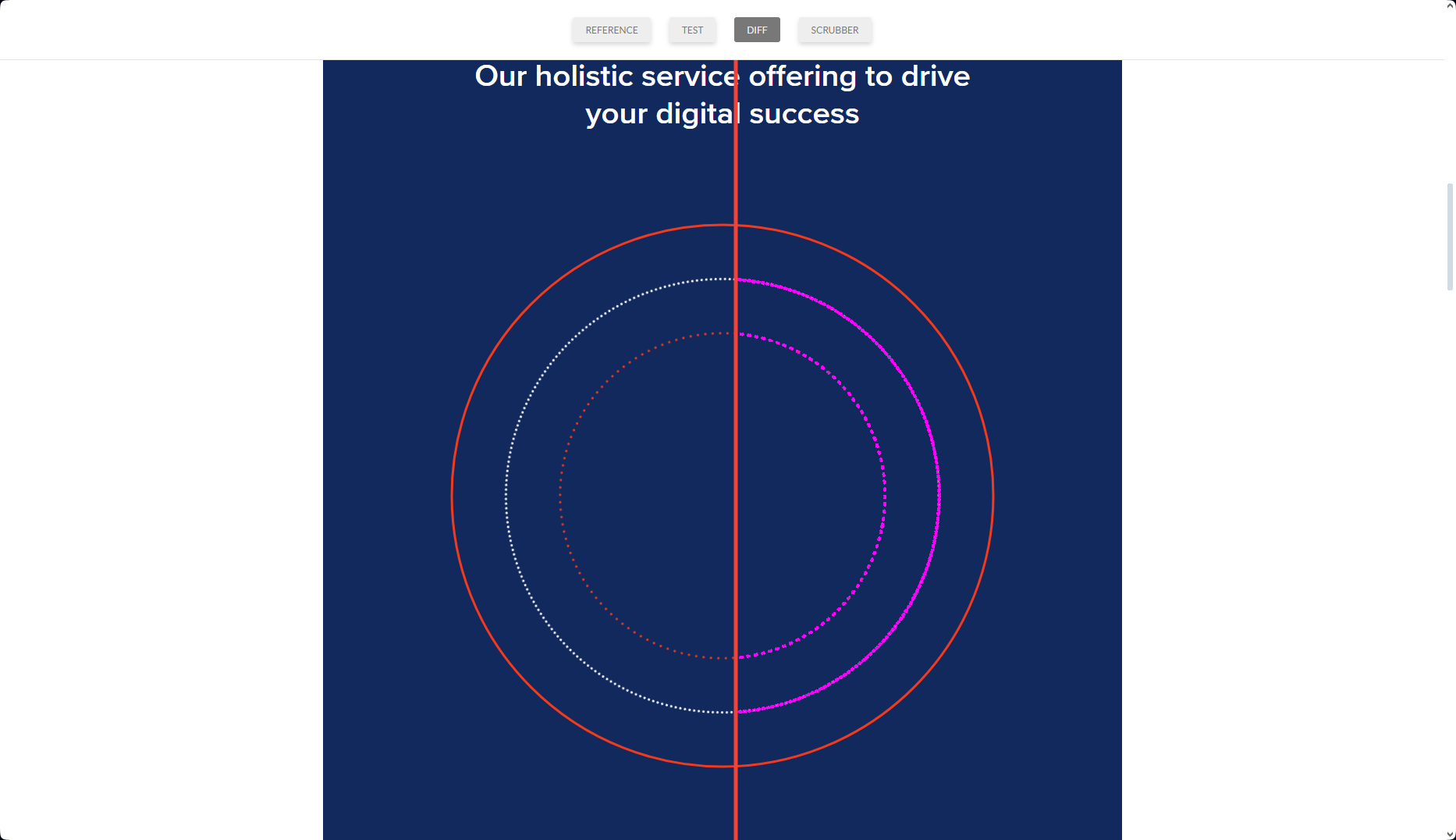
The magenta colored areas show the difference between the screenshots. In this case, the dots were slightly shifted and can be ignored. You can slide the vertical line to see the difference between the reference and test image.
Integration to Azure DevOps Pipeline
Prerequisites
Include configs in your repository
Before you change the pipeline, you must check in the config files created and customized by BackstopJS in the repository.
Set tokens to replace later
If you have several environments that are to be tested, it makes sense to use a configuration file in which the URL is defined as a token that can be replaced for different stages. Here we defined $(Target.WebsiteUrl) that will be replaced by https://www.merkle.com/, but it could also be something like https://www.dev.merkle.com.
In order to store the test results somewhere, a storage must first be created, e.g. an Azure Blob Storage can be used for this.
Steps on Azure DevOps
Set variable CurrentDateTime
Unfortunately, there is no variable like a timestamp that we could use to add to the file name when we archive the backstop data. Therefore, we added a variable called CurrentDateTime, which we set in the Set CurrentDateTime step. The script looks as follows:
Add a variable with the name BackstopConfig and set it to the path of the checked-in file backstop.json.
Replace tokens
Use the task Replace token to replace the website URL. In this case, Target.WebsiteUrl is a variable defined in the pipeline. The step could look like this:
Use again the Command line task and run the following command
call backstop test --config="$(BackstopConfig)"call backstop approve
Deploy your app
Now you have to deploy your web app and warm up your cd instance.
Test BackstopJS
Run the test and make sure that a failed test does not cause the pipeline to stop. Since BackstopJS will most likely return some false positives, this could lead to an unwanted stop of the pipeline. Set continueOnError: true.
After each deployment, the developers can look specifically at the BackstopJS logs from the pipeline and see if there are any failed tests. If this is the case, the test results can be downloaded as a zip file, unpacked and analyzed.
Conclusion
In our experience, there are often false positives, so the tool should not be used as a 100% reliable test tool. Nevertheless, it saves a lot of testing effort if several dozen pages are checked automatically and only those from the error messages need to be checked manually.
]]>ryilmazSetting up Headless SXA on Sitecore 10.32023-12-05T11:00:00+00:002023-12-05T11:00:00+00:00https://sitecore.merkle.com/setting-up-headless-sxa-site-with-sitecore10.3
Photo by panumas nikhomkhai: https://www.pexels.com/@cookiecutter/
Introduction
With the release of Sitecore 10.3, Sitecore also released a headless version of the existing SXA framework. This is based on the existing Sitecore headless framework namely JSS. But the process of deploying a headless SXA site is different from the normal JSS solution. In this article, we will deal with the deployment of a headless SXA site to Sitecore 10.3.
Prerequisite
You should have.
Installed Sitecore 10.3 with Sitecore PowerShell Extensions and SXA either using Sitecore Install Assistant (SIA) or PowerShell. You can download SIA from here.
Installed latest NodeJS version. My node version was 18.14.2
Installed Sitecore Headless Rendering 21.0.0 from here.
Setting up Headless Site
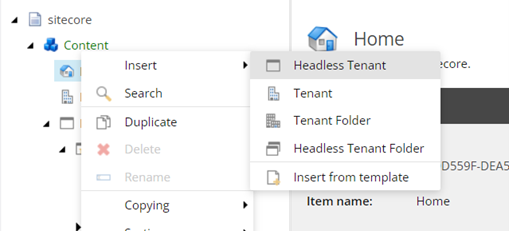
Open the Sitecore Content Editor and right click on the Content Node, you will see an insert option for a Headless Tenant. Please create a new Headless Tenant.
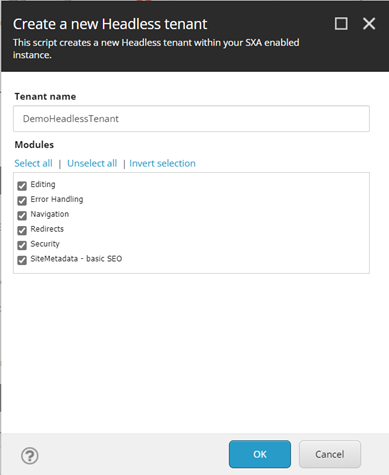
After clicking insert new Headless Tenant, a new popup will appear. Please enter a name for the Tenant and select all the modules if unselected. After clicking Ok, it will take some time and create a new Headless Tenant.
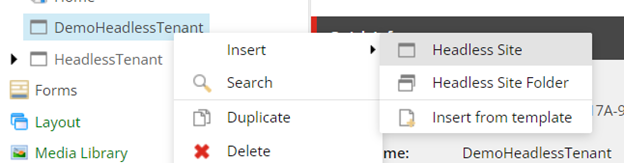
After creating a new Headless Tenant, we need to create a new Headless Site. For creating the new Headless Site, please right click on the recently created Headless Tenant and insert a new Headless Site.
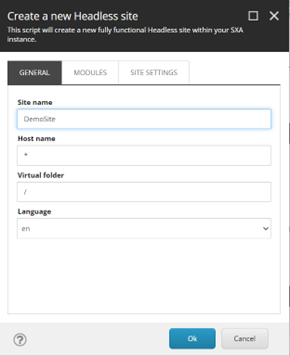
After clicking insert Headless Site, a pop-up will appear. In the General Tab, please enter the new Site Name and keep all the existing settings same.
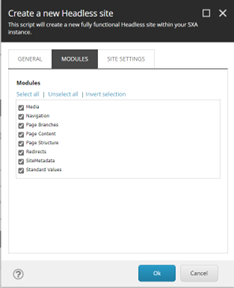
After that, go to Modules tab and click on the Select All and click on the Ok. We don’t need to make any changes in the Site Settings tab.
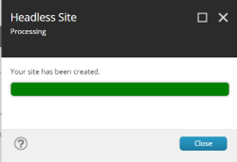
It will take some time to create the Site. It will show the below pop-up after creation.
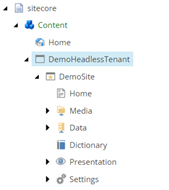
After your Site is created, you will see a new site node in the Tenant with all the created item structures like in non-headless SXA.
Setup Rendering Host
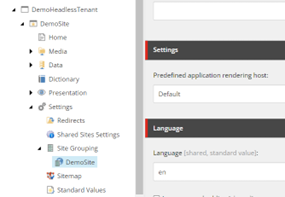
This is the default rendering host setting for the Headless SXA. The location of the rendering host lies in the Site Template in the Settings node of the Site. The Default rendering host can be found on the below location.
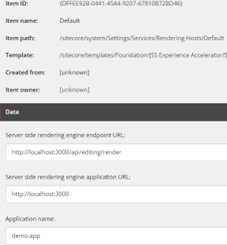
Please update the values of the fields for the Default Host as below:
Set Server-side rendering engine endpoint URL to - http://localhost:3000/api/editing/render
Set Server-side rendering engine application URL to - http://localhost:3000
Set Application name same as your Next.JS app name - demo-app (this is my app name)
Create JSS API Key
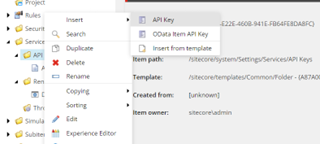
We need to create an API key for our headless application. Please navigate to the below location and right click the API Keys folder and insert a new API Key.
/sitecore/system/Settings/Services/APIKeys
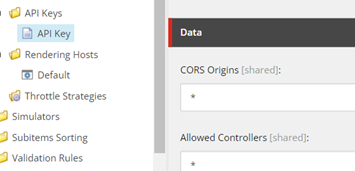
Set the Value of CORS Origin and Allowed Controllers to *. We will use the ID of this item as API Key in our JSS application setup later.
Creating JSS Application
To create the JSS Application, first we need to install the Sitecore JSS package globally. Please use the below command to install the same.
npminstall-g@sitecore-jss/sitecore-jss-cli
After installing the above package, we need to create a new JSS Application with a pre-defined template. Sitecore provides 7 different base templates namely Next.js, react, angular, Vue, react-native, node-headless-ssr-experience-edge and node-headless-ssr-proxy. For this demo, I will use the Next.js template.
You will need to install Jss and Next.js template before creating a Next.js application. Please run the below command for installing the Next.js template.
Note: In the above command, please change the appName and hostName as per your setup.
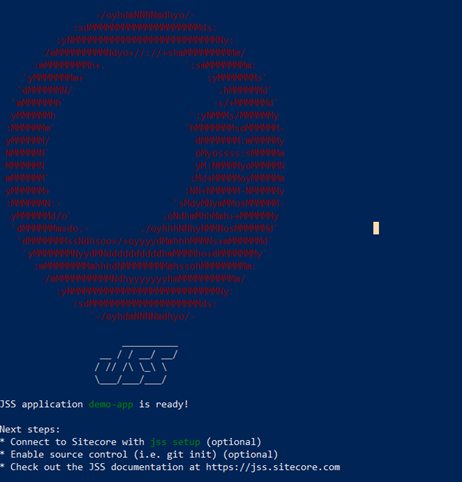
After running the above command, it will ask several questions, as written below:
Where would you like your new app created?
It will show the default path on the right side as in screenshot below. You can simple press enter to install on the default path or can provide a new path for creating an app.
How would you like to prerender your application?
In this question, it will ask to choose prerendering technique whether to choose Static Site Generation (SSG) or Server Side Rendering (SSR). Please choose as per your need.
After the above question, it will start installing the npm packages and your app will be created.
Setting up JSS Application
After creating the JSS application, you need to make few configurations. Please go to the root folder of your JSS app and run below command.
jsssetup
After running the above command, it will ask you several questions as below:
Is your Sitecore instance on this machine or accessible via network share?
In this question, it’s asking if Sitecore instance is installed on your machine or not. Please press y in this case.
Path to the Sitecore folder (e.g. c:\inetpub\wwwroot\my.siteco.re):
In this question, please provide the path of web root of your Sitecore instance.
Sitecore hostname (e.g. http://myapp.local.siteco.re; see /sitecore/config; ensure added to hosts):
In this question, please provide the hostname of your Sitecore instance.
Sitecore import service URL [https://sxa1030sc.dev.local/sitecore/api/jss/import]:
In this question, it will show you default url for import service based on the hostname you provided earlier. Please don’t make any changes and press enter.
Sitecore API Key (ID of API key item):
In this question, please enter the ID of the API Key we created earlier in Sitecore at below location.
/sitecore/system/Settings/Services/API Keys/API Key
Please enter your deployment secret (32+ random chars; or press enter to generate one):
In this question, please enter the 32+ random characters deployment secret for your application or you can simply press enter and it will create one for you. I simply pressed enter. This was the last step of the setup process.
After the above steps, we need to do some manual configs. Please follow the same as below
Set JSS Config Files
We need to remove default site need from the config file located at the below location as we are managing sites from Sitecore.
/demo-app/sitecore/config/demo-app.config
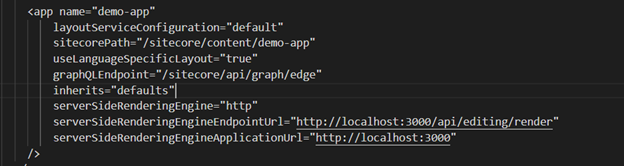
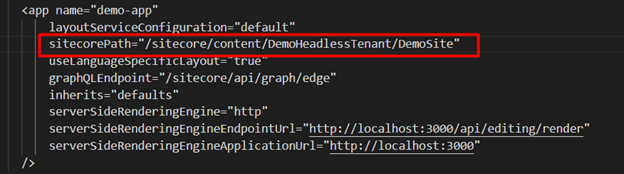
Scroll down the same file and verify the app registration urls.
In the above config, update the sitecorePath with the path of your site in the headless tenant. For the above demo, the url is below and it will look like below screenshot.
After updating the above path, please scroll down and find the config named JavaScriptServices.ViewEngine.Http.JssEditingSecret and uncomment it. Please go to the adjacent file (demo-app.deploysecret.config for the above demo) for the deployment secret, copy the same, and update in the above config. It will look like this below.
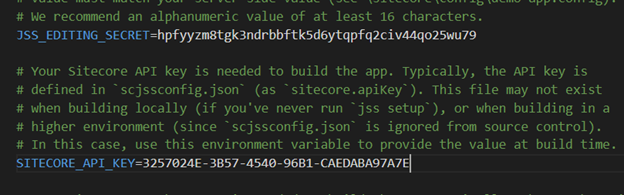
After updating the above file, please go to the adjacent file (demo-app.deploysecret.config for the above demo) for the deployment secret and copy the same. Please go to .env file at the root of the project and paste the same to JSS_EDITING_SECRET. Copy the API key from Sitecore and paste it to SITECORE_API_KEY. After the above changes, your file will look like below.
Setting Dictionary
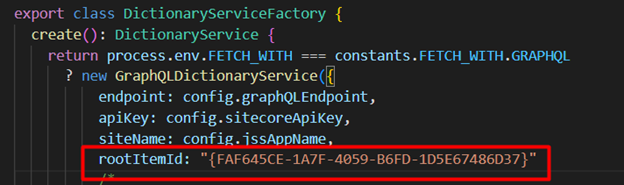
Please go to /src/lib/dictionary-service-factory.ts and create a new property named rootItemId at the below location mentioned in the screenshot. The value of rootItemId is the ID of the Home Page of your site in Sitecore. For this particular demo, the path of item is /sitecore/content/DemoHeadlessTenant/DemoSite/Home and it’s ID is {FAF645CE-1A7F-4059-B6FD-1D5E67486D37}
Deploy the config
After making all the above changes, we need to deploy our changes to the Sitecore instance. Please run the below command to deploy your config changes.
jssdeployconfig
The changes will be deployed to below path at your Sitecore Instance.
C:\inetpub\wwwroot\sxa1030sc.dev.local\App_Config\Include\zzz
Note: Sometimes after deployment of config, changes are not reflected, please do an IIS Reset after the deployment and verify your changes in /sitecore/admin/showconfig.aspx and look for the setting named JavaScriptServices.ViewEngine.Http.JssEditingSecret.
Running the App for First Time
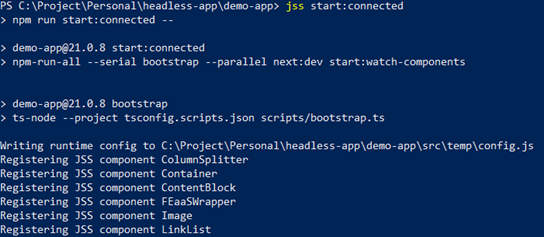
After the deployment of the config files, our app is ready to run for the first time. Please run the below command to run the app in connected mode.
jssstart:connected
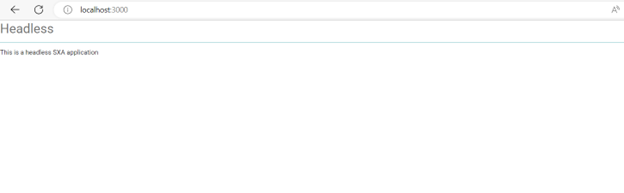
After this, your app will run and you need to open localhost:3000 (if this port is not already being used). There you will see a blank page.
We will go to the content editor and open the Home Page in Experience Editor and will make some changes. I’ll show you my home page after changes.
Common Errors
Could not resolve dependency next from @sitecore-jss/sitecore-jss-nextjs
While creating an app, this error sometimes stops npm package install. Please use the below command before doing npm install again.
npmconfigsetlegacy-peer-depstrue
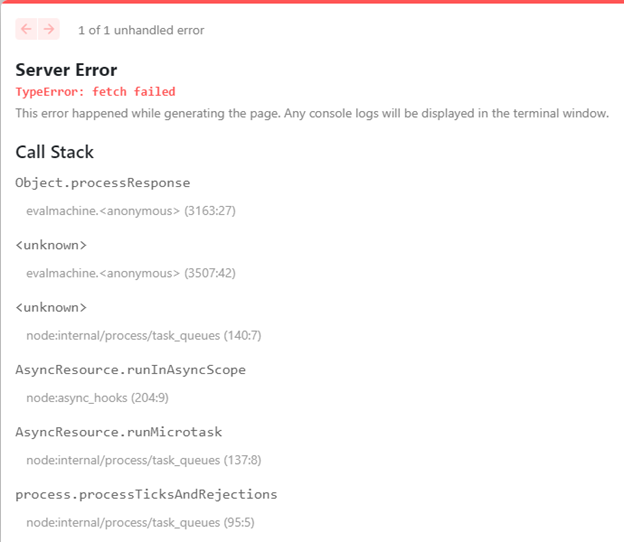
TypeError:fetch failed:
To fix this error, please run the below command before running jss start:connected
$env:NODE_TLS_REJECT_UNAUTHORIZED=0
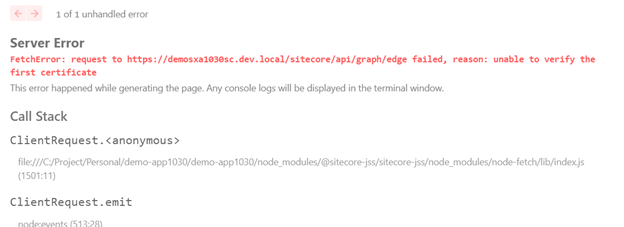
Unable to verify the first certificate
Please follow the article with link here for the above fixes.